The best AI browsers in 2026 do more than put a chatbot in a sidebar. A sidebar chatbot is a website you could already visit. What makes a browser genuinely AI-native is that the assistant can see what you can see — the page in front of you, the twelve tabs behind it, the thing you copied ten minutes ago — and can act on that context without you re-explaining it. That difference sounds small in a demo and is the whole product in daily use.
It also means the right pick depends less on which model is inside and more on which part of your browsing is actually slow. Some people lose time to research: opening fifteen sources, skimming them, and trying to hold the comparison in their head. Some lose it to writing: replying, summarising, drafting from something they just read. Some lose it to tab sprawl, where the cost is not reading but finding what they already read. And some want the browser to take actions rather than assist — which, as this guide explains below, is a different category with a different shortlist.
This guide covers the five browsers people actually shortlist: Dia, Comet, Brave with Leo, Microsoft Edge with Copilot, and Opera Neon. If what you want is software that clicks through sites and completes web tasks on your behalf, read our best AI browser agents guide instead — that is the automation category, not this one. If your bottleneck is specifically research, the best AI research tools guide covers dedicated tools that beat any browser at synthesis, and Perplexity vs ChatGPT for research compares the two assistants most often used for it. And if your browser choice is really a question about which work assistant you standardise on, start with Copilot vs ChatGPT for work or the ChatGPT vs Claude comparison.
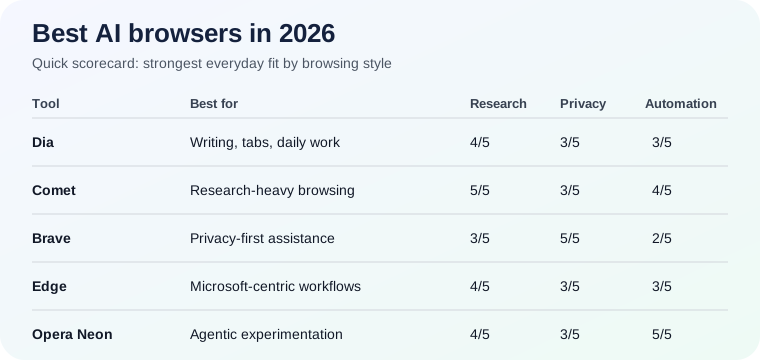
Quick answer: which AI browser should you use?
- Dia — best for people who live in tabs and want the smoothest writing, summarising, and context-aware help across a normal workday.
- Comet — best for research-heavy browsing, where you want the browser to behave like a built-in answer engine with sources.
- Brave with Leo — best for privacy-conscious users who still want browser-native AI help.
- Microsoft Edge with Copilot — best if your work already runs on Microsoft 365 and you want the lowest-friction AI browser inside that ecosystem.
- Opera Neon — best if you specifically want the most agentic, experimental interpretation of what a browser can be.
For most people the real decision is Dia vs Comet, and it splits cleanly: Dia is an AI-native browser for thinking and writing inside the tabs you already have open, while Comet is a research assistant that happens to be your browser. Pick by which sentence describes your day.
What an AI browser actually does
Every product in this category claims the same four things. They are worth separating, because a browser can be excellent at one and mediocre at the next, and vendors rarely say which.
- Page understanding. Can the assistant read the page you are on and answer questions about it — not about the internet in general? This is the floor. Anything that cannot do it is a chat window wearing a browser.
- Cross-tab context. Can it reason over several open tabs at once: compare three product pages, pull the common thread out of five articles, find the tab where you saw a number? This is where AI browsers earn their keep and where they differ most.
- Composition. Can it draft, rewrite, shorten, or change the tone of text in place — in a reply box, a form, a document — using what is on screen as the source material?
- Action. Can it do things: click, navigate, fill fields, run a multi-step task? This is the thinnest layer in real browsers, and deliberately so. It is also the layer that turns into the browser-agent category once it becomes the point.
A useful test when you evaluate any of these: ask the assistant something that is only answerable from your open tabs. If it answers from general knowledge instead, you have layer 1 and a search engine, not layer 2.
AI browser vs AI browser agent
This is the distinction people most often get wrong, and it costs them a month of using the wrong tool.
An AI browser helps you inside your normal browsing. You are still driving. The assistant reads, summarises, compares, drafts, and answers, and every action stays yours. The value compounds quietly: a few minutes saved per research session, less tab-hunting, fewer copy-pastes into a separate chat window.
An AI browser agent tries to complete the task for you. You describe an outcome — fill in this portal, gather these fifty listings, work through this back-office flow — and it operates the browser. That is a different reliability conversation. Agents are strongest on repeatable, structured, low-stakes flows and weakest exactly where you would most want to trust them: dynamic sites, authentication, and anything where a small mistake is expensive.
If you want execution, our best AI browser agents in 2026 guide is the right list. If you want better search, page understanding, and less tab chaos, stay in the browser lane. Most people who think they need an agent actually want layer 2 done well.
Dia — best for tab-heavy knowledge work
Dia's central idea is that the browser's input field should also be where you ask for things, so the assistant sits in the path you already use rather than in a panel you have to remember. It is built around your open tabs as the working set: ask about them, write from them, pull them together.
Dia is best for: people whose day is reading and replying — knowledge workers, marketers, analysts, students — with many tabs open and constant small writing tasks. It rewards anyone whose real complaint is "I know I read that somewhere in here."
Where it falls short: it is the least specialised pick on this list. If your job is deep research synthesis, a dedicated research tool goes further, and if you need automation, this is not the category. Switching your primary browser is also a real cost — extensions, profiles, saved passwords, muscle memory — and Dia asks for that switch to deliver its benefit.
Bottom line: Dia is the best AI browser in 2026 for most knowledge workers, because it improves the part of browsing everyone actually does all day instead of the part that demos well.
Comet — best for research-heavy browsing
Comet is Perplexity's browser, and it inherits the thing Perplexity is known for: answering a question with sources attached rather than with a list of links. In a browser, that turns into an assistant that is unusually good at "what do these pages say, and where exactly does each claim come from."
Comet is best for: anyone whose browsing is investigation — competitive research, due diligence, buying decisions, journalism, coursework. If you routinely end a session with a comparison you have to assemble by hand, this is the pick that shortens it most.
Where it falls short: the research strength is also its shape. If most of your browsing is writing and replying rather than finding, you are paying for the wrong strength, and Dia's in-place composition will feel better. Cited answers also encourage a specific bad habit, covered in the section below.
Bottom line: Comet is the strongest choice if your bottleneck is finding and comparing information, and it is the one browser here that can genuinely replace a separate research tab.
Brave with Leo — best privacy-first AI browser
Brave's whole position is built on blocking tracking by default, and Leo, its built-in assistant, is pitched to fit that stance rather than to be the most capable model in the room. Brave's claim is that assistant use should not become another stream of behavioural data — a claim worth reading in their current privacy documentation rather than taking from any guide, since policies change and this one is the reason to choose the product.
Brave with Leo is best for: people who were already going to use Brave, and anyone for whom the privacy posture is the requirement rather than a preference — which is a more reasonable position in a browser than in a standalone chatbot, because your browsing context is the sensitive material.
Where it falls short: it is not the most capable assistant here on cross-tab reasoning or composition, and that is a deliberate trade rather than an oversight. If you want frontier capability, this is not the pick; if you want a good assistant inside a browser you already trust, it is.
Bottom line: Brave is the best privacy-first option, and the only one on this list where the privacy story is the product rather than a feature.
Microsoft Edge with Copilot — best for Microsoft-centric work
Edge's advantage is not the assistant in isolation — it is that the assistant is on the same side of the fence as your documents, mail, and calendar. If your work lives in Microsoft 365, a browser assistant that can act as a bridge between a web page and your own files removes a step nothing else on this list can remove.
Edge with Copilot is best for: organisations already standardised on Microsoft, IT-managed fleets where a new browser is not a personal choice, and anyone who works between web research and Office documents all day.
Where it falls short: most of the benefit is realised inside that ecosystem, so a Google Workspace team gets a competent page-aware assistant and little of the integration argument. And in a managed environment, what you get is whatever your admin has enabled, which is worth checking before comparing features you cannot turn on.
Bottom line: Edge is the lowest-friction AI browser for Microsoft-centric work and an unremarkable one outside it.
Opera Neon — best for the agentic frontier
Neon is the most ambitious reading of this category: not a browser with an assistant, but a browser built around delegating work. It is the most interesting product here and the one least suited to being your only browser, because early-category ambition and daily reliability pull against each other.
Opera Neon is best for: people who want to see where AI browsers are going, run it alongside a stable primary browser, and are genuinely interested in agentic workflows rather than shopping for a default.
Where it falls short: most people are not buying autonomous form-filling as their first requirement. They want reading, comparing, and drafting to be faster. Judged as an everyday browser, that is a mismatch — not a defect.
Bottom line: the right pick if you want the frontier version of this category, and the wrong one if you want the safest mainstream choice today.
The part nobody demos: the assistant will be confidently wrong
Every browser here will, sooner or later, summarise a page in a way the page does not support — a number transposed, a caveat dropped, a claim from one tab attributed to another. Cross-tab reasoning makes this more likely, not less, because more context means more opportunities to blend two sources into one confident sentence.
This is the single biggest practical risk in the category, and it is worth building one habit around: when a summary is going to inform a decision or get repeated to someone else, check the specific claim against the specific page. Our guides on how to fact-check AI answers and why AI hallucinations happen cover how to do that quickly, and the short version is that a citation proves a source exists, not that the source says what the summary claims.
How to choose: match the browser to your bottleneck
Skip the feature grids and answer one question — what specifically is slow?
- "I can never find what I already read." Cross-tab context is your layer. Dia.
- "I spend an hour assembling comparisons." Research with sources. Comet.
- "I don't want my browsing feeding a model." Privacy posture. Brave with Leo.
- "I'm constantly moving between web pages and Office files." Ecosystem integration. Edge with Copilot.
- "I want it to do the task, not help me do it." Wrong category — read the browser agents guide, and if the tasks are repeatable and structured, that is where the win is.
Two things matter more than any of the above and never appear on a comparison page. Speed: if invoking the assistant breaks your flow, you will quietly stop using it within a week, and a slower excellent assistant loses to a faster adequate one. Fit with what you already have: the best AI browser you do not switch to is worth nothing, and every one of these asks you to move your default.
What to test in your first week
Give any candidate the same five tasks — they surface the differences a feature list hides:
- Open five tabs on one question and ask for the disagreement between them. This tests real cross-tab reasoning; a weak assistant will summarise the active tab and stop.
- Ask something answerable only from an open tab. If it answers from general knowledge, note that.
- Draft a reply from a page you are reading, in place. Composition quality varies more than page understanding does.
- Check one summarised fact against the source. Do this deliberately, once, early, so you calibrate how much to trust it.
- Use it for a full day without opening your old browser. Friction shows up on day one; capability differences show up in week one.
Mistakes to avoid
Buying the category like a demo reel. The impressive clips are almost always layer 4 — the agentic actions — and almost nobody's daily bottleneck is there.
Assuming the browser replaces your assistant. These are browsers with good assistants, not the strongest models available. Deep work still goes to a dedicated tool.
Treating summaries as verified. The failure mode is a confident, plausible, slightly wrong sentence, which is exactly the kind you do not re-read.
Switching your default before testing. Run the candidate alongside your current browser for a week. Extensions, profiles, and password managers are where the real switching cost lives.
Verdict
Dia is the best AI browser in 2026 for most knowledge workers. It has the cleanest everyday pitch — use your tabs, keep your context, get better output without breaking flow — and it improves the part of browsing that actually fills the day.
Comet is the best pick for research-heavy users and the strongest single-purpose argument on this list. Brave with Leo is the best privacy-first option. Edge with Copilot makes the most sense for Microsoft-centric work. Opera Neon is right only if you want the frontier rather than the safe default.
And the honest framing for the category as a whole: an AI browser is a compounding convenience, not a transformation. Pick the one that fits how you already work, verify anything that matters, and if what you actually want is execution rather than assistance, buy an agent instead.