The best AI coding assistants in 2026 are no longer just autocomplete with better marketing. They can read a codebase, make multi-file edits, run terminal commands, review pull requests, and in some cases act more like a junior pair programmer than a typing shortcut.
That is why this category is moving fast right now. Recent March 2026 coverage keeps circling the same few names: Cursor, GitHub Copilot, Claude Code, and Windsurf. That lines up with what buyers actually care about now: agent workflows, model access, and whether the tool helps across the full development loop instead of one narrow moment in the editor.
If you mostly need a general AI assistant outside the IDE, start with our ChatGPT vs Claude comparison. If your job mixes coding with spreadsheets, docs, and Microsoft workflows, our Copilot vs ChatGPT for work guide is also relevant because the decision changes once the IDE is not your whole day.
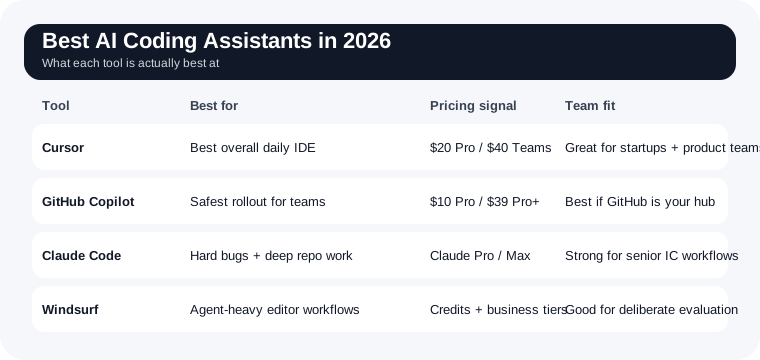
Quick answer: which AI coding assistant should you use?
- Use Cursor if you want the best all-around IDE-native AI coding experience right now.
- Use GitHub Copilot if you want the safest mainstream choice for teams, GitHub workflows, and predictable adoption.
- Use Claude Code if you want the strongest terminal-first agent for deep repo work and complex implementation tasks.
- Use Windsurf if you want an agent-heavy editor with strong model flexibility and are willing to learn a newer workflow.
For most individual developers, Cursor is the best AI coding assistant in 2026. For engineering managers buying for a team, GitHub Copilot is still the easiest low-friction rollout. For serious deep-work coding sessions, Claude Code is the tool people keep reaching for when the task is actually hard.
Why this category is hot right now
The freshness signal here is unusually clear. New 2026 roundups and developer commentary are focused less on "which model writes nicer code" and more on agent behavior: can the tool plan steps, inspect files, keep context, and complete real work across multiple files without constant babysitting?
That shift matters. It is the same broader pattern showing up across AI products: users are paying for compressed workflows, not novelty. We saw it in our AI meeting assistant comparison, and the same thing is happening in coding. Developers do not want another chat tab. They want less grind in bug fixing, refactoring, repo navigation, and code review.
Cursor — Best overall for most developers
Website: cursor.com
Cursor has the strongest overall balance right now: good agent flows, polished IDE experience, access to frontier models, and pricing that is straightforward enough to understand. Its official pricing currently starts with a free Hobby tier, then Pro at $20/month, Pro+ at $60/month, and Teams at $40/user/month.
The product advantage is not just model quality. It is the workflow. Cursor feels like it was built around AI-assisted development instead of having AI stapled onto an old editor. Agent requests, tab completions, cloud agents, team rules, and model access all live in one coherent environment.
Cursor is best for:
- Solo developers and startups who want one primary AI IDE
- People doing frequent multi-file edits and refactors
- Teams that want shared rules, shared workflows, and admin controls without full enterprise overhead
- Developers who care about overall feel, not just raw model output
Where Cursor falls short: once usage climbs, pricing can jump fast compared with entry-level Copilot. It is also best if you are willing to commit to its environment rather than keep everything tool-agnostic.
Bottom line: Cursor is the strongest default recommendation because it is the most complete package for real daily development work.
GitHub Copilot — Best for teams and GitHub-native workflows
Website: github.com/features/copilot
GitHub Copilot is still the enterprise-safe choice for a reason. The official plans are simple: Free, Pro at $10/month, and Pro+ at $39/month, with broader business controls available through GitHub's team and enterprise stack.
Copilot's big advantage is surface area. It works inside GitHub, in major editors, in the CLI, and increasingly through agent workflows tied directly to issues, pull requests, and repo context. It is not always the flashiest product, but for many orgs it is the easiest one to approve.
GitHub Copilot is best for:
- Engineering teams already centered on GitHub
- Developers who want broad editor support without switching tools completely
- Managers who care about standardization, adoption, and security posture
- Teams that want AI help in pull requests and issue-driven workflows
Where Copilot falls short: it can feel less opinionated and less powerful than Cursor or Claude Code during messy, exploratory work. If your workflow is heavy on deep refactors, repo archaeology, or autonomous terminal tasks, it is not always the most satisfying tool.
Bottom line: Copilot is the easiest recommendation for teams that want something dependable, widely supported, and easy to justify operationally.
Claude Code — Best for hard problems and terminal-first deep work
Website: claude.com/product/claude-code
Claude Code is different from the others because it is less about a polished IDE shell and more about giving a strong reasoning model real working access to your codebase and tools. Anthropic currently bundles Claude Code access into higher Claude plans rather than positioning it as a separate cheap coding add-on. The current pricing page lists Pro at $20/month and Max plans starting at $100/month, both including Claude Code with higher usage on Max.
That pricing makes sense only if you actually use the depth. Claude Code shines when the work is ambiguous: untangling a weird bug, tracing behavior through a large repo, planning a refactor, or making coherent changes across multiple files with real terminal context.
Claude Code is best for:
- Experienced developers working on hard codebase problems
- Terminal-first workflows
- Code reading, debugging, and implementation planning
- People who want stronger reasoning more than flashy UX
Where Claude Code falls short: it is not the cheapest option, and it is less plug-and-play for teams that want a standardized editor rollout. If you mainly want lightweight suggestions while typing, it is overkill.
Bottom line: Claude Code is the best coding assistant here when the task is genuinely difficult rather than repetitive.
Windsurf — Best for agent-heavy workflows and model flexibility
Website: windsurf.com
Windsurf's positioning is very explicitly about agent work. Its pricing page emphasizes support for multiple major model providers, prompt credits, centralized billing, analytics, SSO, and admin controls rather than selling a cute autocomplete story.
That tells you what the product is for. Windsurf is trying to be a serious development environment for people who want AI to do more than suggest the next line. It is especially interesting if you care about model choice, team controls, and a more agent-forward editor experience.
Windsurf is best for:
- Developers who want a stronger agent feel than classic Copilot-style suggestions
- Teams evaluating newer AI-native editors
- Workflows that benefit from multiple model options
- People who like experimenting at the front edge of coding tools
Where Windsurf falls short: its pricing page is less transparent in quick text extraction than Cursor or Copilot, and the workflow can feel less universally familiar. It is a better fit for deliberate evaluation than for default conservative rollout.
Bottom line: Windsurf is worth serious attention if you want an agent-native alternative and are not locked into GitHub Copilot already.
How to pick the right AI coding assistant
- You want the best overall daily IDE: Cursor
- You are buying for a team and want low-friction rollout: GitHub Copilot
- You want help with the hardest repo work: Claude Code
- You want a newer agent-first editor to evaluate: Windsurf
If you are freelancing or building software solo, pair this decision with our AI tools for freelancers guide because the best stack often includes one coding tool, one general assistant, and one workflow tool rather than trying to make one product do everything.
What not to do with AI coding assistants
- Do not buy based only on benchmark screenshots.
- Do not confuse "writes code" with "understands your repo".
- Do not let an AI tool merge changes you have not reviewed.
- Do not pay for the most expensive tier until you know your actual usage pattern.
If you are worried that using these tools means outsourcing judgment, that instinct is healthy. Our AI safety guide covers the privacy side, and our software engineer jobs article is useful context for the bigger question of what these tools are changing and what they are not.
Verdict
Cursor is the best AI coding assistant in 2026 for most developers. It has the best overall blend of quality, workflow design, and day-to-day usability.
GitHub Copilot is the best team rollout choice. Claude Code is the strongest pick for deep technical work. Windsurf is the most interesting alternative if you want a more agent-forward environment.
The right move for most people is not picking the tool with the loudest fanbase. It is picking the one that matches how you actually work: editor-first, repo-first, team-first, or problem-first.