The best AI data analysis tools in 2026 do more than answer a question about a CSV. The useful ones help you move from messy data to a real conclusion faster: upload files, ask follow-up questions, build charts, dig into root causes, summarize findings for the team, and keep the whole thing grounded enough that you can trust what comes back.
This category is also moving fast right now. March 2026 search results are full of fresh “best AI data analysis tools” roundups instead of generic chatbot lists, which is usually a sign that buyers have started treating the category as its own budget line. The product movement backs that up too: Hex is pushing harder on Notebook Agent and governed team analytics, Microsoft’s Power BI Copilot docs were updated this week with broader agent surfaces, Tellius is leaning into agentic analysis instead of simple Q&A, and Tableau Next is now explicitly selling agentic analytics tied to Agentforce and Slack.
If your data work still mostly happens in Excel or Google Sheets, read our AI spreadsheet tools guide first. If you are deciding between general work assistants before you buy a data-specific layer, start with Copilot vs ChatGPT for work. And if your job is more source synthesis than analytics, the AI research tools roundup is the better fit.
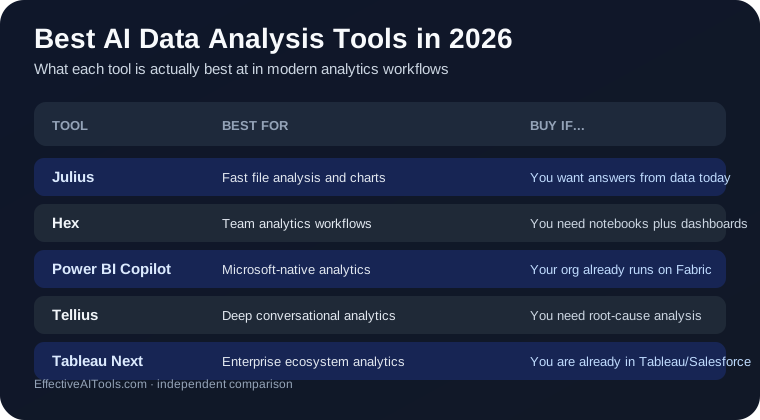
Quick answer: which AI data analysis tool should you use?
- Use Julius if you want the fastest path from uploaded files to useful charts, answers, and analyst-style output.
- Use Hex if you need a serious AI analytics workspace for both data people and business teams.
- Use Power BI Copilot if your organization already lives in Microsoft Fabric or Power BI and you want AI inside that stack.
- Use Tellius if you need deeper conversational analysis, root-cause exploration, and enterprise controls across messy data.
- Use Tableau Next if you are already committed to Tableau or Salesforce and want agentic analytics tied to that ecosystem.
For most individuals and lean teams, Julius is the best default AI data analysis tool in 2026. For broader team analytics workflows, Hex is the strongest all-around platform choice. For Microsoft-heavy companies, Power BI Copilot is the least disruptive buy.
Why AI data analysis tools matter right now
Data analysis is one of the easiest places to separate real AI value from marketing noise. Either the tool helps you get to a trustworthy answer faster, or it turns analysis into a longer prompt-writing exercise. Buyers are getting better at spotting that difference.
The category split is also clearer than it was a year ago:
- Ad hoc file analysis tools help you upload a spreadsheet or CSV, ask questions, and get charts fast.
- Team analytics platforms combine notebooks, dashboards, semantic structure, and AI help in one place.
- Enterprise agentic analytics tools push further into governance, deeper investigation, and cross-system reasoning.
That is why this is now a real buying decision instead of a side effect of whichever chatbot license you already have. The same pattern shows up in our AI tools for consultants and AI tools for accountants guides too: teams want AI that can survive contact with actual work.
| Tool | Best for | What it does best | Link |
|---|---|---|---|
| Julius | Fast file analysis and charting | Quick answers, visualizations, and analyst-style exploration without a full BI setup | → Visit Julius |
| Hex | Team analytics workflows | Collaborative AI analytics, notebooks, dashboards, and governed sharing | → Visit Hex |
| Power BI Copilot | Microsoft-heavy organizations | Natural-language analysis and report help inside the Power BI / Fabric environment | → Visit Power BI Copilot |
| Tellius | Deep conversational analytics | Root-cause analysis, multi-table exploration, and agentic enterprise analytics | → Visit Tellius |
| Tableau Next | Tableau / Salesforce ecosystems | Agentic analytics with semantics, Slack workflows, and enterprise context | → Visit Tableau Next |
Julius — Best overall for fast, analyst-style answers from files
Website: julius.ai
Julius gets the top spot because it is the clearest answer for the most common 2026 buyer need: “I have files, I have questions, and I want useful charts and analysis without building a whole analytics stack first.” That is still a huge market, and Julius stays focused on it instead of trying to become every possible data product at once.
Its appeal is speed. Julius makes the most sense when the bottleneck is not dashboard governance or enterprise rollout but getting from raw data to an informed answer quickly. That could mean exploring a CSV, comparing segments, spotting patterns, or turning a spreadsheet dump into something presentable before your meeting starts.
Julius is best for:
- Analysts, operators, consultants, and founders working from files
- Fast exploratory analysis and charts
- People who want an AI data analyst feel without standing up BI infrastructure
- One-off or recurring analysis where speed matters more than platform standardization
Where Julius falls short: it is not the strongest choice when your real need is governed collaboration across a larger team, semantic modeling, or analytics deeply embedded in an enterprise platform. That is where Hex, Power BI, Tellius, or Tableau Next pull ahead.
Bottom line: Julius is the best AI data analysis tool in 2026 for most people who want fast answers from datasets without a heavy setup burden.
Hex — Best for collaborative AI analytics across technical and business teams
Website: hex.tech
Hex is the strongest all-around team platform here. Its pitch is not just “chat with data.” It is an AI analytics workspace for your whole team, with notebooks, dashboards, governed sharing, integrations, and newer Notebook Agent positioning that clearly aims beyond individual analysis into repeatable team workflows.
That matters because most data bottlenecks are not purely technical. They live between technical and non-technical people. Hex is unusually credible on that bridge. It wants analysts, operators, and business stakeholders working in the same system instead of throwing screenshots and half-explained charts into Slack.
Hex is best for:
- Teams that want one analytics surface for notebooks, dashboards, and AI help
- Data organizations serving both technical users and business users
- Companies that care about governed sharing, embedded analytics, and collaborative workflows
- Buyers who want AI added to a serious analytics platform, not a loose chatbot wrapper
Where Hex falls short: it is more platform than many solo users need. If you mainly want to upload files, ask questions, and move on, Julius is usually the sharper and simpler tool.
Bottom line: Hex is the best AI data analysis platform for teams that need collaboration, structure, and AI in the same analytics environment.
Power BI Copilot — Best for Microsoft-native analytics teams
Website: Power BI Copilot overview
Power BI Copilot is the obvious choice if your organization already runs on Power BI or Fabric. Microsoft is expanding the AI surface here in a way that matters: the report-agent Copilot pane is generally available, broader agent experiences are in preview, and the product is designed to help with both business-user analysis and creator-side tasks like report and DAX support.
The real advantage is ecosystem fit. A lot of organizations do not want another analytics vendor unless the value is overwhelming. If reports, dashboards, admin controls, and data pipelines already live in the Microsoft stack, getting AI inside that environment is often the highest-probability buy.
Power BI Copilot is best for:
- Organizations already committed to Power BI and Microsoft Fabric
- Teams that want natural-language analysis inside existing reports and dashboards
- Business users who need guided exploration without leaving the Microsoft environment
- Companies that prefer ecosystem consolidation over adding a new analytics platform
Where Power BI Copilot falls short: Microsoft is pretty explicit that good results depend on prepared semantic models and paid Fabric or Premium capacity. So this is not a magical shortcut around analytics hygiene. It works best when your data environment is already in decent shape.
Bottom line: Power BI Copilot is the smartest AI data analysis buy for Microsoft-heavy teams that want AI inside the reporting stack they already trust.
Tellius — Best for deeper conversational analytics and root-cause discovery
Website: tellius.com/platform
Tellius is the most investigation-oriented product on this list. Its platform language is blunt in a good way: chat-based AI fails when the job involves many tables, huge row counts, enterprise-specific definitions, or multi-step analysis. That is exactly the kind of problem a lot of teams actually have.
The interesting part is that Tellius goes beyond a search-style interface. It pushes AI insights, automated root-cause analysis, semantic understanding, conversational analytics, and agentic flows. That makes it more attractive for organizations where “what happened?” is only the start and the real question is “why did it happen, and what should we do next?”
Tellius is best for:
- Organizations with messy, multi-source, high-volume data
- Teams that want conversational analytics plus deeper diagnostic insight
- Buyers who care about governance, security posture, and enterprise deployment options
- Cross-functional analytics workflows where plain search is not enough
Where Tellius falls short: it is not the lightest-weight or cheapest-feeling category entry. If your analysis needs are modest, the overhead can be more than you need.
Bottom line: Tellius is the strongest pick here when your AI analytics tool needs to do more than answer simple questions and actually help investigate the why behind the numbers.
Tableau Next — Best for Salesforce and Tableau-centered enterprises
Website: tableau.com/products/tableau-next
Tableau Next is the most ecosystem-shaped option in this roundup. Tableau is no longer just talking about dashboards. It is now pitching agentic analytics tied to Agentforce, a semantic layer, enterprise workflow actionability, and Slack-based analytics experiences. That makes it feel less like a standard BI update and more like a strategic platform move.
If you are already a Tableau or Salesforce shop, that matters a lot. The value is not only in asking questions about data. It is in connecting those answers to the systems your teams already use for customer operations, workflow execution, and internal collaboration.
Tableau Next is best for:
- Enterprises already invested in Tableau and Salesforce
- Teams that want agentic analytics tied to workflow systems
- Organizations that care about semantics, enterprise control, and Slack-based data access
- Buyers making a strategic analytics-platform decision, not a quick tactical one
Where Tableau Next falls short: it is not the simplest buy for smaller teams, and its strongest value shows up only if the broader Tableau or Salesforce ecosystem fit is already there.
Bottom line: Tableau Next is the best AI data analysis tool here for large organizations where analytics is part of a broader Salesforce- and Tableau-centered operating model.
What about ChatGPT for data analysis?
ChatGPT is still genuinely useful for data work. It can help you think through an analysis plan, write SQL or Python, explain trends, summarize findings, and sanity-check chart ideas. For some one-off tasks, that is enough. If your data lives in spreadsheets, our spreadsheet tools comparison and ChatGPT for Excel guide are still relevant.
But it is usually not the best dedicated AI data analysis tool once you need repeatability, team governance, semantic structure, embedded dashboards, or enterprise-grade controls. General assistants are helpful. They are not automatically analytics platforms.
How to pick the right AI data analysis tool
- You want the fastest path from files to charts and answers: Julius
- You want a serious analytics workspace for mixed teams: Hex
- You already run on Microsoft analytics infrastructure: Power BI Copilot
- You need deeper diagnostic and conversational analytics: Tellius
- You are already committed to Tableau or Salesforce: Tableau Next
If your real bottleneck is spreadsheet cleanup rather than analytics, start with Best AI Spreadsheet Tools in 2026. If the buying decision is role-specific, our accountants and consultants guides will usually narrow the stack faster.
What not to do with AI data analysis tools
- Do not trust a smooth natural-language answer if the tool cannot show enough context, query logic, or supporting evidence.
- Do not buy an enterprise analytics platform if your real need is just ad hoc CSV analysis.
- Do not assume your existing dashboards are ready for AI just because the vendor added a Copilot button.
- Do not ignore data handling, security, and admin controls if the analysis touches customer, financial, or regulated information.
- Do not confuse “chat with data” with real analytical reasoning. They overlap, but they are not the same product job.
Verdict
Julius is the best AI data analysis tool in 2026 for most people who want fast answers, charts, and analyst-style help without a heavy setup. It is the cleanest fit for the most common use case.
Hex is the best team platform. Power BI Copilot is the best Microsoft-native choice. Tellius is the strongest investigation-oriented option. Tableau Next is the right buy for larger organizations already living inside Tableau and Salesforce.
The real buyer question is not “which AI data analysis tool is smartest?” It is whether your bottleneck is fast file analysis, collaborative team workflows, Microsoft fit, deeper diagnostic analytics, or enterprise ecosystem alignment. Pick for that bottleneck and this category gets much easier.