The best AI note-taking apps in 2026 are not just blank pages with a summarize button bolted on. The useful ones help you capture fast, recover context later, connect ideas across meetings and documents, and turn notes into something you can actually use.
This category is getting more interesting because the products are diverging in obvious ways. Notion AI is now pushing AI Meeting Notes, Enterprise Search, and Custom Agents inside the same workspace. Granola is going hard on bot-free meeting capture plus instant follow-up work. Google positions NotebookLM as an AI research tool and thinking partner instead of a generic notes app. Reflect is keeping the personal-note lane strong with encrypted notes, voice transcription, and chat with your own writing. Tana is trying to turn notes into a structured context graph that compounds over time. That is a real market shift: buyers are not just looking for storage anymore. They want memory.
If your real pain is meeting capture, read our AI meeting assistants comparison too. If most of your notes start as PDFs, source packs, or research tabs, the best AI research tools guide is the better companion. And if you are still deciding which general assistant belongs around your notes workflow, start with ChatGPT vs Claude in 2026.
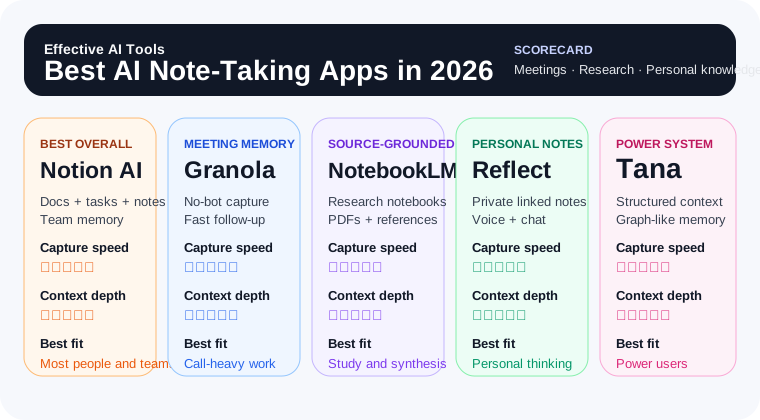
Quick answer: which AI note-taking app should you use?
- Use Notion AI if you want the best all-around mix of notes, docs, tasks, meeting capture, and searchable team knowledge.
- Use Granola if you live in back-to-back meetings and want the cleanest post-meeting notes without another bot joining the call.
- Use NotebookLM if your notes are really a research workflow built around your own sources, PDFs, and reference material.
- Use Reflect if you want a fast personal notes app with AI help, backlinks, and strong privacy posture.
- Use Tana if you are a power user who wants structured notes, graph-style context, and an AI-heavy system that can grow with your work.
For most people, Notion AI is the best default AI note-taking app in 2026 because it covers the broadest range of real note work without feeling too niche. If meetings are the main problem, Granola is the sharper buy. If the job is source-grounded thinking, NotebookLM is the better tool.
Why AI note-taking is a real category now
Notes used to be a storage problem. Now they are more of a retrieval and execution problem. People already capture too much. The question is whether the tool helps surface the right thing at the right moment and reduce the painful gap between “I wrote that down somewhere” and “I can actually use it now.”
That is why this category now breaks into clearer sub-types:
- Workspace note systems try to merge docs, notes, tasks, and AI search in one place.
- Meeting-first note tools optimize for capture during calls and fast follow-through afterward.
- Research notebooks work best when your notes need to stay grounded in uploaded sources.
- Personal thinking apps focus on speed, privacy, and connected reflection.
- Structured knowledge systems reward people who want graph-like context and reusable data.
You can see the same pattern in adjacent workflows. Our AI tools for project managers guide and AI tools for executive assistants guide both end up circling the same truth: the valuable tool is the one that helps your memory become operational, not just archived.
| Tool | Best for | What it does best | Link |
|---|---|---|---|
| Notion AI | Best overall | Combines notes, docs, tasks, meeting notes, and workspace-aware AI in one system | → Visit Notion AI |
| Granola | Meeting-heavy work | Captures meetings without bots and turns rough notes into cleaner summaries and action items | → Visit Granola |
| NotebookLM | Research and study notes | Keeps answers grounded in your own documents, notes, and reference sources | → Visit NotebookLM |
| Reflect | Personal knowledge and journaling | Fast linked notes with AI voice transcription, note chat, and end-to-end encryption | → Visit Reflect |
| Tana | Power users and structured systems | Turns meetings and notes into structured, graph-like context for deeper follow-through | → Visit Tana |
Notion AI — Best overall for notes, docs, tasks, and team memory in one place
Website: notion.com/product/ai
Notion AI gets the top spot because it covers the widest set of note-taking jobs without forcing you into a weird specialist workflow too early. It now spans classic docs, wikis, tasks, databases, AI Meeting Notes, Enterprise Search, and newer Custom Agent features inside the same workspace. That matters because a lot of notes stop being useful when they live too far away from the rest of the work.
The strongest case for Notion AI is simple: your notes should probably live next to your projects, decisions, task lists, and operating documents. If your team already works in Notion, the AI layer is much more useful than yet another disconnected note app because it can act on that existing context instead of starting from zero every time.
Notion AI is best for:
- Teams that already keep docs, wikis, and projects in Notion
- People who want one place for notes, tasks, and shared knowledge
- Meeting-heavy teams that want notes to become action items and searchable context
- Buyers who care about admin controls, search, and broader workflow leverage
Where Notion AI falls short: it is not the lightest or fastest-feeling pure personal notes app. If you want a private daily-thinking tool that disappears into the background, Reflect feels cleaner. And if your only problem is meeting capture, Granola is more focused.
Bottom line: Notion AI is the best AI note-taking app in 2026 for most people because it turns notes into something connected and reusable instead of leaving them trapped in a side drawer.
Granola — Best for back-to-back meetings and faster follow-through
Website: granola.ai
Granola is the sharpest specialist pick in this category. Its pitch is refreshingly direct: an AI notepad for back-to-back meetings. It captures your computer audio directly, avoids the usual meeting-bot theater, and then improves the notes you actually wrote instead of pretending the raw transcript is already good enough.
That is why Granola works so well for people whose real note problem is not journaling or knowledge management but meeting memory. Sales calls, hiring interviews, stakeholder check-ins, customer discovery, manager one-on-ones — this is where a lot of useful information gets lost. Granola is built to fix that gap fast.
Granola is best for:
- Consultants, founders, executive assistants, PMs, and sales teams with heavy calendars
- People who want cleaner meeting notes without adding another participant bot
- Users who need follow-up emails, action items, and recap formats right after the call
- Teams that share meeting notes into Slack, docs, CRMs, or project updates
Where Granola falls short: it is narrower than Notion or Reflect. If you want a broader personal or team note system that handles research notes, long-form thinking, and ongoing project knowledge, Granola is not the whole answer. It is a meeting-memory weapon.
Bottom line: Granola is the best AI note-taking app in 2026 for people whose most important notes happen inside meetings. If that is you, also read our dedicated AI meeting assistants comparison.
NotebookLM — Best for source-grounded research, reading notes, and study workflows
Website: notebooklm.google
NotebookLM is not the best traditional notes app here. It still makes this list because it solves a different note-taking problem extremely well: thinking with your own sources. Google frames it as an AI research tool and thinking partner, and that is the right mental model. If your notes usually start with lecture slides, PDFs, articles, briefs, transcripts, or source packs, NotebookLM is a much cleaner fit than a generic chat window.
The big advantage is trust. Instead of asking a model to improvise from vague memory, you point it at the actual material you care about. That makes it strong for researchers, students, analysts, and anyone doing multi-source synthesis. It is especially useful when the note itself is less important than being able to revisit and interrogate the source set later.
NotebookLM is best for:
- Students studying from class material, readings, and lecture notes
- Researchers and knowledge workers synthesizing large source packs
- People who want question-answering and summaries grounded in uploaded material
- Users who think in projects or notebooks rather than one giant note database
Where NotebookLM falls short: it is weaker as an everyday operating system for tasks, meetings, and free-form note capture. If you want ongoing team knowledge or daily note habits, Notion or Reflect are better defaults.
Bottom line: NotebookLM is the best AI note-taking app here when your notes are really a source-grounded research workflow. That makes it a natural companion to our best AI research tools and best AI tools for students guides.
Reflect — Best for private personal thinking with AI help
Website: reflect.app
Reflect is the personal-notes pick. It feels built for people who want speed, calm, and connected thinking instead of a heavy workspace platform. The app leans into backlinks, calendar context, quick capture, AI prompts, voice-note transcription, note chat, and end-to-end encryption. That combination is unusually attractive if your notes are mostly for you rather than for a whole team.
What Reflect gets right is the feel of the workflow. A lot of AI notes products become bloated because they want to be project management, a wiki, and a CRM all at once. Reflect stays closer to the “keep it open all day and think in it” model. That is why it is appealing for writers, founders, solo operators, and anyone trying to build a reliable personal knowledge habit.
Reflect is best for:
- Personal knowledge management and journaling
- People who want fast linked notes without team-workspace overhead
- Users who care about privacy and end-to-end encryption
- Voice-note capture, web snippets, and daily thinking workflows
Where Reflect falls short: it is not the strongest shared-team system, and it does not try to be the meeting-notes specialist or the best source-grounded research notebook. Its strength is personal clarity, not organization-wide documentation.
Bottom line: Reflect is the best AI note-taking app in 2026 if your notes are primarily for your own thinking and you want AI to support that without turning the product into a bloated operating system.
Tana — Best for power users who want structured notes that compound
Website: tana.inc
Tana is still the most opinionated product in this roundup, which is exactly why some people love it. Its current positioning is much more ambitious than standard notes software: meetings that ship, work done in the meeting, and a context graph that builds itself over time. In plain English, Tana is trying to make your notes structured enough that AI can do more with them later.
That makes it attractive for power users, operators, researchers, and systems-minded people who hate the feeling of information disappearing into flat documents. Tana rewards people who like objects, relationships, and reusable context. If that sounds exciting rather than exhausting, it belongs on your shortlist.
Tana is best for:
- Power users who want more structure than normal notes apps provide
- Teams or individuals building reusable knowledge systems over time
- People who want meetings, projects, and notes to connect in a graph-like model
- Users comfortable learning a more opinionated system
Where Tana falls short: it is not the easiest recommendation for beginners. The product shape is more ambitious, the learning curve is real, and some buyers will find Notion or Reflect much easier to adopt.
Bottom line: Tana is the best AI note-taking app here for people who want structure, compounding context, and a more system-heavy approach than the category norm.
What about Obsidian, Apple Notes, or Evernote?
They still matter. Obsidian is great if you want a local-first, plugin-friendly thinking environment and are willing to build more of the AI layer yourself. Apple Notes is still excellent for quick capture, but it is not an AI-first buyer decision. Evernote is still around, but it no longer feels like the clearest answer for the most important 2026 note-taking jobs.
That is the general pattern: plenty of note apps now have some AI. Fewer have a clear reason to buy them because of the AI layer. The five above do.
How to pick the right AI note-taking app
- You want the best all-around notes + docs + tasks system: Notion AI
- Your real problem is meeting capture and follow-through: Granola
- Your notes come from PDFs, lectures, briefs, and source packs: NotebookLM
- You want a personal thinking app with privacy and speed: Reflect
- You want a structured, graph-like knowledge system: Tana
If your job is role-specific, pair this with our AI tools for executive assistants or AI tools for project managers guides. The best stack is often one general assistant, one notes layer, and one execution layer rather than trying to make a single product do everything.
What not to do with AI note-taking apps
- Do not confuse transcription with understanding. A perfect transcript is still not a good note unless it helps you recover the important parts quickly.
- Do not buy the heaviest workspace platform if your real need is private daily thinking.
- Do not dump sensitive notes into a tool before you understand its privacy, retention, and sharing defaults.
- Do not assume one note app should cover meetings, research, personal journaling, and company knowledge equally well.
- Do not optimize for novelty. Optimize for whether you will still trust and use the system after three messy weeks of real work.
Verdict
Notion AI is the best AI note-taking app in 2026 for most people because it handles the broadest slice of real note work: capture, retrieval, meeting notes, shared docs, and reusable knowledge in one place.
Granola is the best meeting-first pick. NotebookLM is the best source-grounded research notebook. Reflect is the best personal-thinking app. Tana is the best power-user system for structured context.
The smartest buyer question is not “which AI note-taking app is smartest?” It is whether you need team memory, meeting follow-through, source-grounded research, private personal thinking, or structured knowledge that compounds. Pick for that bottleneck and this category becomes much easier.