The best AI PDF tools in 2026 do more than slap a chatbot on top of a document. The useful ones help you extract answers fast, verify where those answers came from, compare files, translate dense material, and turn a pile of PDFs into something you can actually work with.
This category also got more serious in early 2026. Adobe pushed harder into AI-powered PDF workflows with new Acrobat AI features and broader Acrobat Studio positioning, while lighter tools kept improving around quick summaries, citations, and multi-document chat. So if you're evaluating PDF AI tools now, you need a current map, not a stale list that treats every “chat with PDF” app like the same product. If you only need a one-off free workflow, start with our guide to summarizing a PDF with ChatGPT. If your job is broader source synthesis across multiple materials, our AI research tools roundup is the better fit. And if you are choosing between general assistants rather than PDF-first tools, read the ChatGPT vs Claude comparison.
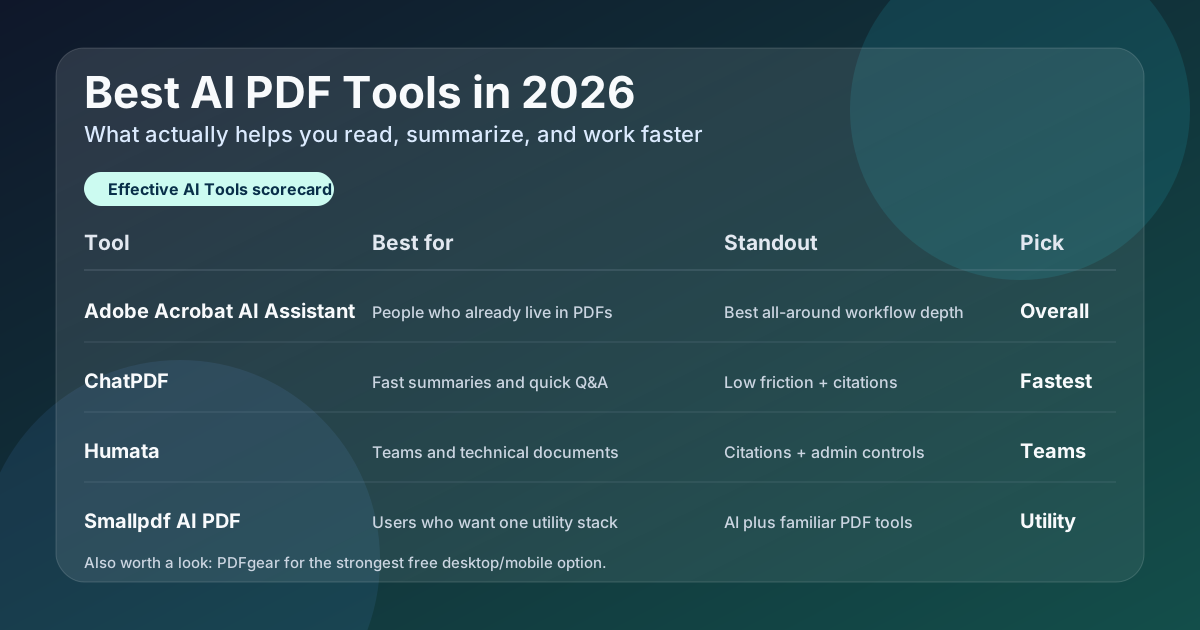
Quick answer: which AI PDF tool should you use?
- Use Adobe Acrobat AI Assistant if you already live in PDFs and want the strongest all-around workflow inside a mainstream PDF app.
- Use ChatPDF if you want the fastest low-friction way to summarize, ask questions, and verify answers with citations.
- Use Humata if you work with technical documents or team knowledge bases and need stronger security and multi-user controls.
- Use Smallpdf AI PDF if you want AI help inside a broader PDF utility stack for summarize, translate, question generation, and task handoffs.
- Use PDFgear if you want a genuinely useful free option on desktop and mobile, not another crippled trial.
Why AI PDF tools matter right now
PDF work is still where a lot of real friction lives: contracts, research papers, decks exported as PDFs, policy docs, handbooks, textbooks, and reports that nobody wants to reread line by line. The better AI PDF tools now do three genuinely useful things:
- Speed up understanding: summarize long files, answer direct questions, and surface the right section fast.
- Reduce verification risk: point back to citations or linked source passages so you can check the answer.
- Connect reading to action: translate, extract tasks, compare documents, or move from insight to draft without starting over.
That makes this a cleaner category than it used to be. Some tools are now best for quick personal document chat, some are better for heavier research or team knowledge bases, and some are better because they sit inside the PDF software you already use. Students should also cross-check our best AI tools for students guide, and legal users should read the AI tools for lawyers roundup before rolling anything into client-sensitive work.
| Tool | Best for | What it does best | Link |
|---|---|---|---|
| Adobe Acrobat AI Assistant | People who already work inside PDFs all day | Strongest all-around mix of chat, summary, and mainstream PDF workflow depth | → Visit Adobe Acrobat |
| ChatPDF | Fast no-sign-up summaries and Q&A | Simple document chat with citations, multi-file chats, and low setup friction | → Visit ChatPDF |
| Humata | Teams, researchers, and technical document sets | Document Q&A with citations, team controls, and stronger admin posture | → Visit Humata |
| Smallpdf AI PDF | Users who want AI plus familiar PDF utilities | Summaries, AI chat, question generation, translation, and guided next actions | → Visit Smallpdf |
| PDFgear | Free desktop and mobile users | Free PDF chat, summarization, and editing workflows across Mac, Windows, and iPhone | → Visit PDFgear |
Adobe Acrobat AI Assistant — Best overall for people who already live in PDFs
Adobe Acrobat AI Assistant is the strongest overall pick if PDF work is already part of your daily job and you do not want a separate niche tool bolted onto the side. Adobe’s current pitch is straightforward: chat directly with your files, get summaries and insights quickly, then turn those insights into action inside a product people already trust for document work.
Why Acrobat stands out: it sits closest to the actual PDF workflow instead of only helping you interrogate a file. Adobe has also kept extending the product around AI-powered document work, which matters if you want something that looks more like a platform than a one-feature widget.
- Best for knowledge workers, consultants, operators, and anyone already paying the Acrobat tax because PDF work is unavoidable
- Strong fit when summaries and Q&A need to sit next to editing, sharing, and downstream document tasks
- Safer mainstream choice than betting your whole process on a smaller point tool
Where Acrobat falls short: it is heavier and more expensive than you need if your real problem is just “I want to upload one file and ask a few questions.” In that case, ChatPDF or PDFgear will feel faster.
Bottom line: Adobe Acrobat AI Assistant is the best AI PDF tool in 2026 for most professionals who already work in PDFs constantly and want one serious home base.
ChatPDF — Best for the fastest no-sign-up PDF chat experience
ChatPDF is the easiest recommendation here for people who want speed over ceremony. Its positioning is refreshingly clear: summarize, compare, and ask questions to PDFs fast, free, and without forcing account creation before you even know if the tool is useful.
Why ChatPDF stands out: it does the core PDF AI job cleanly. Multi-file chats, side-by-side reading, citations back to source material, and multilingual support make it more useful than a lot of “simple” tools that are really just demos with a billing page attached.
- Best for students, researchers, and solo users who want answers fast
- Good fit when you care about citations and verifying where an answer came from
- Useful if you want a quick alternative before moving up to a heavier PDF suite
Where ChatPDF falls short: it is not trying to be your full document platform. If you need broader admin controls, permissions, or deeper PDF utility workflows, it stops sooner than Humata, Smallpdf, or Acrobat.
Bottom line: ChatPDF is the AI PDF assistant I would point most people to first if they want the fastest path from upload to useful answer.
Humata — Best for technical documents and team knowledge bases
Humata is the strongest fit here when the job is not just “chat with one PDF,” but “help a team move faster through a pile of complicated documents.” Its positioning leans harder into serious document analysis: summarize findings, compare documents, search for answers, and keep results tied back to citations and managed file access.
Why Humata stands out: it is more team-oriented than most of the lighter PDF AI tools. Role-based security, encrypted storage, private cloud language, document embeddings, and higher-tier OCR support make it more credible for business and research workflows than a pure consumer-first app.
- Best for technical papers, internal documentation, research shops, and team-shared document collections
- Good choice if you want citation-backed answers and stronger admin posture
- Useful when multiple people need access to the same document base instead of running isolated chats
Where Humata falls short: it feels like more system than casual users need. If you just want quick student-style summaries or personal reading help, ChatPDF or PDFgear is easier. If you want a mainstream PDF app first and AI second, Acrobat is cleaner.
Bottom line: Humata is the best AI PDF tool here for teams and heavier technical-document workflows where citations and access control matter.
Smallpdf AI PDF — Best for AI help inside a familiar PDF utility stack
Smallpdf AI PDF is the pragmatic pick for people who already think of Smallpdf as a reliable PDF utility brand and want AI layered into that environment. Its current AI pitch is broader than basic question answering: summarize PDFs, chat with files, generate questions, translate documents, and move through agent-like next steps without constantly changing tools.
Why Smallpdf stands out: it bridges classic PDF utility work and AI assistance better than most point products. That makes it a good fit for teams or individuals who already do routine PDF conversion, compression, or cleanup and do not want a separate tool just for AI interrogation.
- Best for users who want one familiar place for both PDF utilities and AI help
- Useful for study materials, prep questions, and multilingual document workflows
- Good middle ground between lightweight chat tools and heavier suites
Where Smallpdf falls short: it feels more like a versatile utility stack than the deepest document-reasoning environment. If your work depends on research-grade citations or serious team governance, Humata and Acrobat still look stronger.
Bottom line: Smallpdf AI PDF is the smartest pick if you want AI features without leaving a familiar everyday PDF toolkit.
PDFgear — Best free AI PDF tool for desktop and mobile
PDFgear earns a spot because it is one of the few options here that still looks genuinely useful even when the budget is zero. Its pitch is blunt: chat with PDFs on Windows, Mac, and iPhone for free, using AI to read, explain, summarize, analyze, translate, and rewrite documents.
Why PDFgear stands out: it combines free PDF chat with actual PDF utility features. Suggested questions, page extraction, merging, splitting, and markup make it feel more complete than a lot of free AI tools that stop at the demo layer. If you are cost-sensitive, that matters.
- Best for freelancers, students, and personal users who want free AI PDF help that is still practical
- Useful if you like working in an installed desktop app instead of only in the browser
- Solid fallback when you want both AI answers and basic PDF manipulation tools
Where PDFgear falls short: it is not the tool I would standardize across a sensitive company environment without doing more security review first. It also feels more app-first than enterprise-first.
Bottom line: PDFgear is the best free AI PDF tool in 2026 for people who want real utility, not just a teaser plan.
Why NotebookLM is not a top PDF-first pick here
NotebookLM deserves a mention because it is genuinely useful with uploaded sources, including PDFs. But I am not ranking it in the top five for this article because it is better understood as a research notebook than a dedicated PDF tool. If your real goal is synthesizing ideas across multiple sources, briefs, notes, and documents, it belongs more naturally in our best AI research tools in 2026 guide.
That distinction matters. A good AI PDF tool should feel native to document work first. NotebookLM is often better when the job is broader than that.
How to pick the right AI PDF tool
- You already work inside PDFs constantly: Adobe Acrobat AI Assistant
- You want the fastest low-friction PDF chat: ChatPDF
- You need team controls and technical-document depth: Humata
- You want AI inside a familiar PDF utility stack: Smallpdf AI PDF
- You want the best free option: PDFgear
If you are mostly doing one-off student or reading workflows, also compare this list with our student AI tools guide. If your needs lean legal or contract-heavy, read the lawyers roundup next before trusting any document AI too much.
What not to do with AI PDF tools
- Do not treat AI answers as a replacement for checking the cited passage.
- Do not assume every “chat with PDF” tool handles multiple files, translation, or strong citations equally well.
- Do not roll a document AI tool into team use without checking permissions, storage, and data handling.
- Do not buy a heavyweight suite if your real need is fast summaries and a few questions.
- Do not ignore the difference between a PDF tool and a broader research notebook. Those are adjacent, not identical.
Verdict
Adobe Acrobat AI Assistant is the best AI PDF tool in 2026 for most people who already spend serious time inside PDFs. It has the strongest overall mix of practical AI help and real document workflow depth.
ChatPDF is the best quick-start option. Humata is the best team and technical-document choice. Smallpdf AI PDF is the best utility-stack middle ground. PDFgear is the best free pick.
The right buying question is not “which PDF AI tool has the flashiest chatbot?” It is whether your real job is quick Q&A, team document analysis, utility-heavy PDF work, or free personal reading help. Buy for that problem and this category gets a lot easier.