Most presentation work is not really presentation work. It is formatting work, rewriting work, and "why does this slide still look bad?" work.
That is why the best AI presentation tools in 2026 are getting so much traction. People do not just want a prettier slide deck. They want to turn rough notes, docs, meeting summaries, or sales talking points into something presentable without losing half a day in PowerPoint.
After reviewing current product positioning and where these tools fit in real workflows, four names keep coming up: Gamma, Canva Magic Design, Beautiful.ai, and Tome.
If you are still deciding whether a general-purpose AI assistant is enough for this kind of work, read our ChatGPT vs Claude comparison first. If your presentation workflow starts with messy writing, our AI writing tools comparison also matters because the draft quality upstream changes how much cleanup you do downstream.
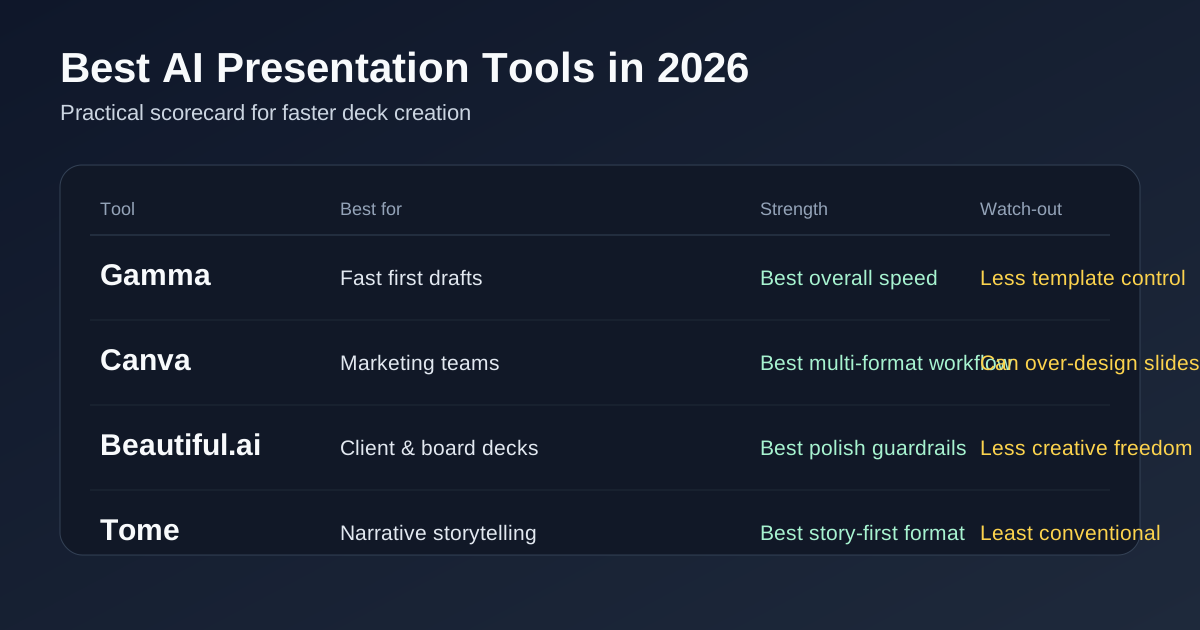
Quick answer: which AI presentation tool should you use?
- Use Gamma if you want the fastest path from outline to clean deck or web-style presentation.
- Use Canva Magic Design if your presentation is part of a broader content workflow with social graphics, video, brand kits, or marketing assets.
- Use Beautiful.ai if you care most about polished business slides and guardrails that stop teammates from making ugly decks.
- Use Tome if you want a more narrative, story-first format and do not mind a less conventional presentation feel.
For most people, Gamma is the best AI presentation tool in 2026. It is fast, good enough visually, and better at turning rough input into an actually usable first draft than most alternatives.
Why these tools are trending now
The freshness signal here is real, not invented. March 2026 search results are full of newly updated roundups for AI presentation software, and the major tools are all leaning harder into prompt-based deck generation, workspace collaboration, and document-to-presentation workflows.
That lines up with a broader pattern across AI software right now: people want tools that collapse multi-step work into one flow. We saw the same demand in our AI meeting assistant comparison, where the winning products are the ones that remove cleanup work instead of just adding another transcript. Presentation tools are going through the same shift.
Gamma — Best overall for speed and first drafts
Website: gamma.app
Gamma is the easiest tool here to recommend if your main problem is speed. Give it an outline, a prompt, or a source document and it gets you to a usable deck shockingly fast.
It also has a modern web-native feel instead of pretending to be PowerPoint with a little AI sprinkled on top. That matters. In practice, Gamma is strongest when you want to present ideas clearly without obsessing over manual alignment, slide spacing, and design cleanup.
Gamma is best for:
- Startup founders building quick investor or client decks
- Consultants who need a presentable draft fast
- Internal strategy updates and team presentations
- People who prefer outline-first thinking over pixel-pushing
Where Gamma falls short: if you need deep brand control, traditional slide-master workflows, or a deck that feels exactly like an executive PowerPoint template, you may end up exporting and polishing elsewhere.
Bottom line: Gamma is the current default pick because it does the core job better than most tools: turning rough thinking into a deck you are not embarrassed to show.
Canva Magic Design — Best for marketing teams and multi-format content
Website: canva.com/magic-design
Canva's advantage is not just presentations. It is the surrounding ecosystem. If your presentation work lives next to social graphics, one-pagers, short videos, team templates, or brand assets, Canva makes more sense than a presentation-only tool.
Magic Design helps with first drafts, layouts, and style direction, but the bigger value is that teams already know Canva. That means less friction when someone else needs to edit the deck, resize a slide into a handout, or repurpose pieces for other channels.
Canva is best for:
- Marketing teams and agencies
- Small businesses making decks plus other creative assets
- Teachers, creators, and teams that already live in Canva
- Anyone who wants one design hub instead of multiple point tools
Where Canva falls short: AI-generated deck structure is decent but not as sharp as Gamma when the source material is messy. It can also tempt teams into over-designing slides because Canva gives you a lot of creative freedom.
Bottom line: Canva is not the cleanest pure presentation pick, but it may be the best business decision if presentations are only one piece of your content workflow.
Beautiful.ai — Best for polished business decks with guardrails
Website: beautiful.ai
Beautiful.ai is built around a smart-template model. That sounds boring until you watch what it prevents: stretched charts, overloaded slides, bad spacing, and the general chaos that happens when five people with different taste levels all touch the same presentation.
Its current positioning is very clearly business-first. The product talks about smart slides, fast presentation drafting, and teams staying focused on message rather than layout. That makes sense. Beautiful.ai is strongest when professionalism matters more than experimentation.
Beautiful.ai is best for:
- Sales decks
- Board updates
- Client presentations
- Ops and finance teams that want cleaner outputs with fewer design debates
Where Beautiful.ai falls short: it can feel more constrained than Canva or Gamma if you want a highly custom visual style. The upside of the guardrails is consistency. The downside is less creative freedom.
Bottom line: if your job is to make business slides look credible quickly, Beautiful.ai deserves a hard look.
Tome — Best for narrative, pitchy storytelling
Website: tome.app
Tome has always leaned more story-first than slide-first, and that is still its appeal. It feels less like classic presentation software and more like a hybrid between a narrative doc, a pitch canvas, and an AI-assisted story builder.
That makes Tome interesting for founders, product people, and anyone trying to explain an idea with momentum instead of creating a standard corporate deck.
Tome is best for:
- Early-stage pitches
- Concept presentations
- Creative storytelling
- Product narratives and lightweight demos
Where Tome falls short: it is the least conventional option here. If your audience expects a classic board-deck feel, Tome can feel off-format. It is also a worse fit for heavily structured business reporting.
Bottom line: Tome is not the safest default, but it is still worth considering if you want a presentation to feel more like a story than a slide stack.
How to choose the right AI presentation tool
Use this shortcut:
- You want the fastest draft: Gamma
- You want presentation + broader design workflow: Canva
- You want cleaner corporate decks with fewer ugly-slide accidents: Beautiful.ai
- You want narrative energy more than traditional slides: Tome
If you already do most of your thinking in a chatbot, you might also pair these tools with a drafting workflow from our ChatGPT productivity guide or use a stronger drafting model from Gemini vs ChatGPT for daily use before you generate the deck itself.
What not to do with AI presentation tools
- Do not let the tool invent your argument. It should help package your thinking, not replace it.
- Do not trust AI-generated numbers, claims, or citations without checking them.
- Do not ship the first draft untouched. The time savings come from faster structuring, not from skipping judgment.
- Do not confuse visual polish with clarity. A prettier bad deck is still a bad deck.
If that last point hits, you are not alone. The same trust problem shows up across AI work generally, which is why our guide to using AI safely and our research-tool comparison are worth reading alongside any AI-generated content workflow.
Verdict
Gamma is the best AI presentation tool in 2026 for most people. It gives you the best combination of speed, usable outputs, and low-friction workflow.
Canva wins if your deck is part of a broader content machine. Beautiful.ai wins if professional consistency matters most. Tome wins when you are telling a story, not just reporting facts.
If your current process is outline in one app, copy into slides, fix formatting, rewrite headlines, then clean up visuals manually, an AI presentation tool can absolutely save time. Just pick the one that matches your actual workflow instead of the one with the flashiest demo.