The best AI spreadsheet tools in 2026 do a lot more than spit out formulas. The good ones can clean tables, classify thousands of rows, explain broken logic, build charts, and help you get from messy exports to something decision-ready without burning half your afternoon.
That matters because the category has moved past the old "ask a chatbot for an Excel formula" phase. The clearest freshness signal now is native spreadsheet execution: GPT for Work pushing row-by-row workflows directly inside Excel and Google Sheets, Microsoft keeping Copilot inside the Excel environment, Rows leaning into an AI-first spreadsheet workspace, and Julius positioning itself as a real AI data analyst rather than a generic assistant. Buyers are not just asking for formula help anymore. They want AI that can actually work on tables.
If your spreadsheet work lives inside finance, read our AI tools for accountants guide too. If your real question is whether to standardize on a broader office assistant before buying a spreadsheet-specific layer, our Copilot vs ChatGPT for work comparison is the better first read. And if you mainly want one-off formula help, our ChatGPT for Excel walkthrough is still useful.
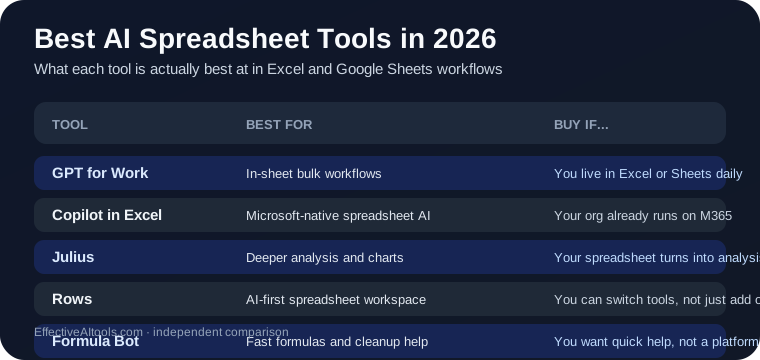
Quick answer: which AI spreadsheet tool should you use?
- Use GPT for Work if you live in Excel or Google Sheets and want the best overall in-sheet AI workflow for formulas, cleanup, and bulk row-by-row tasks.
- Use Copilot in Excel if your company already runs on Microsoft 365 and you want AI inside the native Excel experience.
- Use Julius if your spreadsheet work regularly turns into deeper analysis, charts, and cross-source data questions.
- Use Rows if you are open to a new spreadsheet environment built around AI instead of layering AI on top of old spreadsheet habits.
- Use Formula Bot if your biggest pain is getting formulas, cleanup, and quick analysis help without a heavier setup.
For most people who spend real time inside spreadsheets, GPT for Work is the best default AI spreadsheet tool in 2026. For Microsoft-heavy companies, Copilot in Excel is the most natural fit. For heavier analysis and charting, Julius has the highest ceiling.
Why AI spreadsheet tools are hot right now
Spreadsheet work is one of the easiest places to measure AI value. Either the tool actually saves time on cleanup, analysis, and repetitive table work, or it does not. There is less room for demo magic here than in many AI categories. That is exactly why this category is getting better: buyers have practical standards.
You can see the same pattern across adjacent business tooling too. Our AI tools for operations teams guide and AI tools for small business owners guide show the same shift: people are done paying for clever chat windows that do not survive contact with real workflows.
GPT for Work — Best overall for people who live in spreadsheets
Website: gptforwork.com
GPT for Work earns the top spot because it is unusually clear about the actual spreadsheet job: write formulas, fix errors, build pivots, create charts, clean data, and run row-by-row AI actions directly inside Excel and Google Sheets. That matters more than flashy model branding. If your problem is repetitive spreadsheet labor, native execution beats copying data into a chatbot and pasting results back.
The strongest differentiator is scale. GPT for Work is built around bulk spreadsheet workflows, not just single answers. That makes it a serious tool for categorization, enrichment, translation, deduplication, and other table-shaped tasks that break a lot of general assistants.
GPT for Work is best for:
- Excel and Google Sheets users who want AI inside the file itself
- Bulk row-by-row workflows
- Spreadsheet cleanup, enrichment, and repetitive operations
- Teams that need native spreadsheet execution more than polished dashboards
Where GPT for Work falls short: if your work is drifting out of spreadsheet operations and into broader data analysis, reporting, or multi-source analytics, Julius or Rows may give you a stronger environment.
Bottom line: GPT for Work is the best AI spreadsheet tool in 2026 for most spreadsheet-heavy operators because it stays focused on the work people actually do in Excel and Sheets.
Copilot in Excel — Best for Microsoft 365 teams already standardized on Excel
Website: microsoft.com/microsoft-365/copilot
Copilot in Excel is not the most specialized spreadsheet AI on the market, but that is also why it matters. If your company already lives in Microsoft 365, Copilot is the easiest way to get AI inside the spreadsheet environment your team already uses. There is a real advantage to not introducing yet another tool, add-on, billing line, or change-management project.
Its strength is ecosystem fit. Excel is still the default business spreadsheet for a huge number of finance, operations, and reporting teams, so an AI layer that sits natively inside that environment will always have buyer appeal. If you mainly want AI without changing where the work happens, Copilot makes sense.
Copilot in Excel is best for:
- Microsoft 365 organizations
- Teams that want native Excel AI rather than a separate vendor
- People already using Copilot across Word, Outlook, and Teams
- Spreadsheet tasks where ecosystem consistency matters more than maximum specialization
Where Copilot falls short: it is not the strongest choice for Google Sheets-heavy users, and it can feel broader than deeper if what you really need is large-scale row operations or more analyst-style exploration.
Bottom line: Copilot in Excel is the right default when Excel is already your company standard and you want the least disruptive path to spreadsheet AI.
Julius — Best for deeper analysis, charts, and cross-source spreadsheet work
Website: julius.ai
Julius is the most analyst-shaped pick here. It is less about living inside a single spreadsheet tab and more about connecting data, asking broader questions in plain English, and getting charts, reports, and heavier analysis back quickly. That makes it a better fit than many spreadsheet add-ons once your work starts looking more like analysis than table maintenance.
What makes Julius interesting is that it sits between spreadsheet comfort and analytics tooling. It clearly wants to be the AI data analyst layer for people who are not trying to become full-time SQL or Python users. That is a more ambitious job than formula generation, and for the right buyer it is the better job.
Julius is best for:
- Spreadsheet-heavy analysts
- Teams that need charts, reports, and exploratory data analysis
- People combining spreadsheet data with other sources
- Users who want natural-language analysis without building a full BI stack
Where Julius falls short: if your work mostly stays inside Excel or Sheets and the pain is repetitive spreadsheet execution, GPT for Work is usually the sharper tool. Julius is better when the spreadsheet is the starting point, not the whole job.
Bottom line: Julius is the best AI spreadsheet-adjacent tool for people whose spreadsheet work keeps turning into real analysis.
Rows — Best spreadsheet-native AI workspace
Website: rows.com/ai
Rows is the most interesting option if you are willing to stop treating Excel and Google Sheets as unavoidable. Instead of bolting AI onto old spreadsheet software, Rows is building a spreadsheet environment where AI is part of the workflow from the start: formulas, charts, table joins, text classification, enrichment, PDF extraction, and even more advanced analysis through built-in Python-style capabilities.
That makes Rows a very different buy decision. You are not just adding a helper. You are considering a new working surface. For some teams that is a harder sell. For others, especially teams that keep stretching spreadsheets into lightweight database and reporting workflows, it is exactly the point.
Rows is best for:
- Teams open to a modern spreadsheet workspace instead of legacy defaults
- AI-assisted analysis plus spreadsheet structure in one place
- Users who want charts, joins, enrichment, and cleanup without stitching multiple tools together
- Mobile-friendly spreadsheet access with AI built in
Where Rows falls short: the main downside is migration friction. If your company is deeply locked into Excel or Sheets, the better product does not always win the buying decision.
Bottom line: Rows is the best AI spreadsheet tool if you are ready to adopt an AI-first spreadsheet workspace instead of patching AI into an old one.
Formula Bot — Best for fast formulas and lightweight spreadsheet help
Website: formulabot.com
Formula Bot is the practical pick for people who do not need a whole AI spreadsheet platform. Its appeal is simple: turn plain-English requests into spreadsheet help fast, create formulas, clean data, reshape messy exports, and get quick charts or analysis without committing to something heavier.
That makes it a good fit for solo operators, marketers, founders, and general business users who touch spreadsheets constantly but do not think of themselves as spreadsheet power users. It solves the annoying middle layer between "I know exactly what formula I need" and "I guess I am now learning Excel for the next two hours."
Formula Bot is best for:
- Fast formula generation
- Lightweight spreadsheet cleanup and reshaping
- Non-technical spreadsheet users
- People who want quick help more than a full spreadsheet AI environment
Where Formula Bot falls short: it is not the strongest answer for large row-by-row workflows, native enterprise spreadsheet rollout, or heavier multi-source analysis.
Bottom line: Formula Bot is the easiest low-friction buy if your spreadsheet pain is frequent but not deeply specialized.
What about ChatGPT for Excel and Google Sheets?
ChatGPT is still genuinely useful for spreadsheet work. If you want help writing or debugging formulas, explaining logic, or turning a messy spreadsheet task into a step-by-step plan, it remains one of the best general assistants available. That is why our ChatGPT for Excel guide still gets recommended.
But it is usually not the best spreadsheet-native tool. The moment your workflow depends on staying inside the file, operating across thousands of rows, or working with repeatable table actions, specialized spreadsheet tools pull ahead.
How to pick the right AI spreadsheet tool
- You want the best overall in-sheet Excel or Sheets workflow: GPT for Work
- You are already standardized on Microsoft 365: Copilot in Excel
- You need heavier analysis and charting: Julius
- You want an AI-first spreadsheet workspace: Rows
- You mainly want quick formula and cleanup help: Formula Bot
If your spreadsheet work is mostly finance-driven, also read Best AI Tools for Accountants in 2026. If you want a broader assistant choice first, start with Copilot vs ChatGPT for Work.
What not to do with AI spreadsheet tools
- Do not trust a formula just because it looks plausible. Test it on known rows first.
- Do not hand sensitive finance, HR, or customer data to a tool without checking the vendor’s data handling and admin controls.
- Do not buy a spreadsheet AI product based only on demos. Your real use case is usually cleanup, reconciliation, enrichment, and reporting.
- Do not assume a great general chatbot automatically becomes a great spreadsheet workflow tool.
Verdict
GPT for Work is the best AI spreadsheet tool in 2026 for most people. It solves the actual spreadsheet problem: doing meaningful work inside Excel and Google Sheets without constant copy-paste gymnastics.
Copilot in Excel is the most natural fit for Microsoft 365 teams. Julius wins when spreadsheets are feeding deeper analysis. Rows is the most interesting AI-first spreadsheet environment. Formula Bot is the fast, low-friction option for formula and cleanup help.
The real buyer question is not "which AI spreadsheet tool is smartest?" It is whether you need native spreadsheet execution, Microsoft fit, deeper analysis, a new workspace, or just faster formula help. Pick for that bottleneck and this category starts making sense fast.