Best AI tools for content creators is a crowded search now because the job itself has splintered. A modern creator is usually doing at least four roles at once: researcher, writer, editor, designer, and distributor. That is why the right AI stack matters more than the flashiest one-tool promise.
The strongest creator workflow in 2026 usually looks like this: one tool for planning and ideation, one for long-form drafting, one for graphics, one for video/audio cleanup, and maybe one extra tool for visual-first experiments or short-form repurposing. If a tool does not remove a real bottleneck, it is just another tab.
This guide focuses on what actually helps you ship faster without making your work look generic. If your bottleneck is writing specifically, start with our AI writing tools comparison. If your work is client-facing or solo-business-heavy, our freelancers stack guide is the closer fit. And if you mainly need image generation, our free AI image tools comparison goes deeper there.
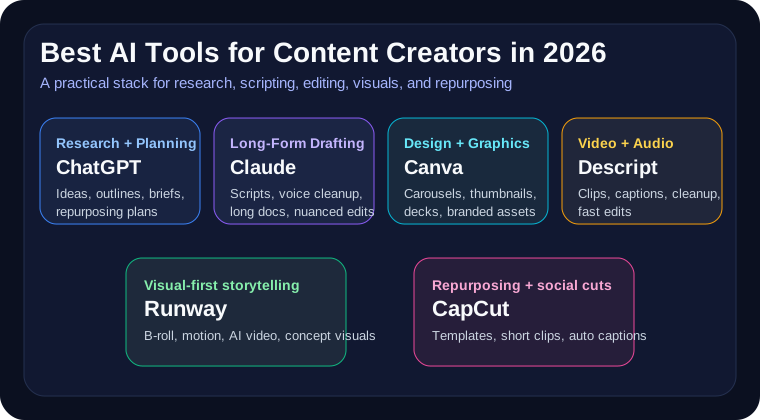
The best AI tools for content creators at a glance
- Best overall planning and scripting assistant: ChatGPT
- Best for nuanced long-form scripts and rewrites: Claude
- Best for thumbnails, carousels, and creator graphics: Canva
- Best for editing podcasts, talking-head video, and clips: Descript
- Best for experimental AI video and B-roll generation: Runway
- Best for fast short-form repurposing: CapCut
Why this category keeps growing
Fresh demand is real here, not imagined. In the last few weeks alone, new comparison posts and creator roundups have been surfacing everywhere, which usually means buyers are actively re-evaluating their stack. The reason is simple: ChatGPT keeps expanding projects, tasks, deep research, and media capabilities; Claude keeps getting stronger for long-form thinking and document work; creator platforms like Descript, Canva, and Runway keep collapsing multiple old tools into one faster workflow.
That makes this category commercially strong, but it also raises the duplicate-risk trap: too many articles just list random tools. The useful version is to match tools to the exact stage where creators keep losing time.
1. ChatGPT: best overall for planning, scripting, and repurposing
For most creators, ChatGPT is still the first subscription to consider because it covers more of the messy middle than any other tool. OpenAI's current pricing stack pushes projects, tasks, custom GPTs, expanded deep research, better memory, and media capabilities. For creators, that translates into practical wins: brainstorming angles, outlining videos, rewriting hooks, turning transcripts into newsletters, and repackaging one asset into five formats.
It is especially good when you need to move from rough idea to publishable plan fast. That overlaps with the daily workflow patterns in how to use ChatGPT to save two hours a day and the drafting patterns in our guide to writing better with ChatGPT.
- Best fit: outlines, hooks, scripts, repurposing plans, title testing
- Weak spot: generic output if you do not give it real context or examples
2. Claude: best for long-form voice and cleaner rewrites
Claude is the better choice when the work needs judgment, not just speed. Anthropic's current plans emphasize projects, research, memory, code execution, and more usage, but the creator advantage is simpler: Claude is often better at holding voice, staying coherent across long drafts, and improving scripts without flattening them into marketing sludge.
If your output includes YouTube scripts, essay-style newsletters, long podcast rundowns, or detailed educational pieces, Claude is often the better second tool after ChatGPT. That is consistent with what we saw in our ChatGPT vs Claude comparison.
- Best fit: long-form scripts, nuanced rewrites, structure cleanup, voice-sensitive edits
- Weak spot: not the strongest tool for visual execution or social-ready asset generation by itself
3. Canva: best for fast, polished creator visuals
Canva stays valuable because it solves a boring but expensive problem: creators constantly need decent-looking assets on short notice. Thumbnails, quote cards, reels covers, slide decks, PDFs, media kits, and sponsor one-pagers all need visual polish even when the creator is not a designer.
That makes Canva one of the highest-ROI tools on this list. It is not about originality at all costs. It is about shipping on-brand graphics fast enough that design work stops blocking publication.
- Best fit: thumbnails, carousels, presentation decks, lead magnets, one-page brand assets
- Weak spot: not ideal for deep story editing or serious research work
4. Descript: best for podcasts, talking-head video, and clip work
Descript remains one of the easiest buys for creators whose workflow lives in audio or video. Its current pricing is explicit about what you are paying for: text-based editing, filler-word removal, studio cleanup, clips, AI co-editing, voice tools, and higher export tiers. That directly maps to creator work where editing speed matters more than traditional timeline complexity.
If you routinely turn interviews, podcasts, livestreams, or educational talking-head videos into finished content, Descript is still one of the fastest ways to go from raw recording to something clean enough to publish.
- Best fit: podcast cleanup, captions, transcript editing, quick social clips, async client videos
- Weak spot: less compelling if you barely touch audio/video or already live in a heavier pro editing stack
5. Runway: best for visual-first storytelling and experimental B-roll
Runway belongs on this list because video creators increasingly need filler visuals, motion concepts, stylized inserts, and prototype scenes without running a full shoot. It is not the right default for every creator, but it can remove a lot of friction when your bottleneck is visual imagination rather than scripting.
This is also where creator demand has been visibly heating up in fresh roundups: text-to-video, clip transformation, and scene generation are moving from novelty toward practical supplement workflows.
- Best fit: B-roll concepts, motion experiments, visuals for explainers, rapid creative testing
- Weak spot: output still needs taste; easy to make slop if you overuse it
6. CapCut: best for short-form speed
CapCut is not the smartest tool on this page. It is one of the most useful because short-form creators need speed more than elegance. Templates, auto captions, quick reframing, and social-native editing flows matter when you are turning one long video into multiple clips.
For creators who publish on TikTok, Instagram Reels, or YouTube Shorts, that convenience matters more than whether the tool is intellectually impressive.
- Best fit: social clip repurposing, captioned vertical edits, fast turnaround content
- Weak spot: less suited for deeper long-form editorial workflows
What most creators should actually pay for first
Most creators should not buy six subscriptions. A smarter stack is:
- ChatGPT for planning, scripting, and repurposing
- Canva or Descript depending on whether your bottleneck is visuals or editing
- Claude only if long-form quality or voice fidelity is a recurring issue
Add Runway if your content depends on visual experimentation. Add CapCut if short-form distribution is the actual growth engine. That is the honest buying advice: pay for the part of the pipeline where you repeatedly stall.
Our verdict
The best AI tools for content creators in 2026 are the tools that help you publish more consistently without making your work feel generic. For most people, that means starting with ChatGPT, then pairing it with Canva or Descript based on your medium.
If your work is more writing-heavy, Claude becomes the best second tool. If it is more visual-first, Runway and CapCut are better adds than yet another chatbot. The goal is not to collect AI tools. The goal is to remove friction from the work you already do every week.