Best AI tools for designers is one of the more useful searches in March 2026 because design AI has finally moved past novelty mockups. The real value now is faster exploration, better handoff context, cleaner design-system reuse, and fewer hours wasted turning fuzzy product direction into something a team can react to.
The freshness signal is strong this week. Google just pushed a major Stitch update around AI-native canvas workflows, voice-guided iteration, and exportable DESIGN.md rules. Figma keeps leaning into AI-era workflow changes and design-to-code context, and the broader market is clearly shifting toward tools that help designers explore more directions faster instead of pretending to replace design taste.
If your role is more roadmap-heavy than craft-heavy, start with our product managers guide. If you mostly need presentation help instead of interface or visual workflow help, read the AI presentation tools roundup. But if your bottleneck is UI ideation, visual iteration, asset generation, and turning direction into usable design work, the stack below is the better fit.
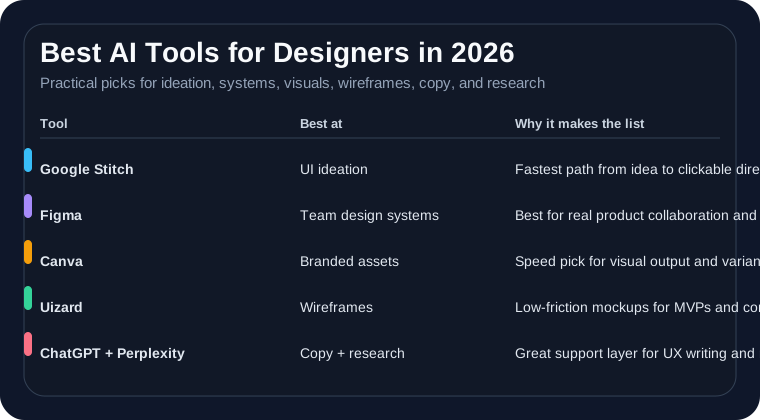
The best AI tools for designers at a glance
- Best for fast UI ideation and concept exploration: Google Stitch
- Best for collaborative product design and design-system workflows: Figma
- Best for marketing visuals, social assets, and fast branded output: Canva
- Best for low-friction wireframes and rough app/product mockups: Uizard
- Best flexible assistant for UX copy, prompts, and creative problem framing: ChatGPT
- Best for fast competitive research and design reference gathering: Perplexity
Why designers are buying differently in 2026
Designers are not buying AI just to generate more screens. They are buying it to compress the ugly middle of the workflow: rough exploration, alternate directions, stakeholder translation, asset cleanup, and handoff context. That is where time disappears.
The useful tools now are the ones that help you explore more options without drowning in output. Designers still need taste, judgment, accessibility awareness, and system thinking. AI is most useful where the work is repetitive, messy, or blocked by low-value friction.
1. Google Stitch: best for fast UI ideation
Google Stitch is one of the freshest and most interesting tools in this category because it is aimed directly at the part of design work that often feels slowest: getting from a half-formed idea to enough interface to react to. The latest Stitch push adds an AI-native canvas, voice-guided iteration, better context handling, and DESIGN.md for portable design rules. That matters because designers do not just need outputs. They need a place to branch, compare, and refine direction quickly.
Stitch looks strongest for early product exploration, landing-page concepts, app-flow experiments, and teams that want to move from prompt to interactive prototype faster than a blank file allows. It is not a replacement for mature product-design systems, but it is one of the better tools for speed at the start of the process.
- Best fit: concepting, landing pages, early flows, rapid exploration, design-direction branching
- Weak spot: less proven than Figma for large collaborative systems and long-lived design libraries
2. Figma: best for collaborative product design and system context
Figma stays on this list because most serious product design still happens where design, feedback, component systems, and engineering handoff come together. The AI angle is not just generation. It is context. Designers increasingly need files, systems, and patterns that work well with engineering tools and AI-assisted code workflows, and Figma is leaning hard into that design-to-dev layer.
If your problem is not “I need a pretty first draft” but “I need design work to survive team reality,” Figma is still the strongest default choice. It is especially valuable when multiple designers, PMs, and engineers are all touching the same product surface.
- Best fit: product design teams, design systems, collaborative reviews, developer handoff, system-scale UI work
- Weak spot: slower than more AI-native tools when you just want rough exploration with minimal setup
3. Canva: best for fast branded visual output
Canva is still the practical pick for designers who have to ship a lot of visual work quickly, especially when part of the job spills into marketing, internal communications, social assets, ad creative, or lightweight web visuals. It is not trying to be the deepest UI design environment. It wins because it is fast, branded, and easy for teams outside design to collaborate in without creating total chaos.
If you are the designer who keeps getting pulled into “just one quick version” requests, Canva often buys back more time than a more sophisticated design tool. It is one of the clearest high-ROI tools for fast asset production and brand-safe iteration.
- Best fit: branded graphics, social content, lightweight campaigns, internal decks, fast visual variants
- Weak spot: not the right center of gravity for serious product UX or complex interaction design
4. Uizard: best for wireframes and rough product mockups
Uizard remains useful because there is still real demand for low-friction wireframing. Not every design workflow needs a full system. Sometimes you need to get a rough app idea, dashboard, onboarding flow, or internal tool concept into visible form quickly. Uizard is good for that middle ground where speed matters more than polish and you want teammates reacting to structure instead of abstract discussion.
It makes the most sense for early-stage products, internal tools, non-designer collaborators, and fast validation cycles. If the question is “can we get this concept in front of people today,” Uizard is still a credible answer.
- Best fit: wireframes, MVP flows, internal tools, startup prototyping, non-designer collaboration
- Weak spot: you will usually outgrow it for refined visual craft and mature production workflows
5. ChatGPT: best for UX copy and creative unblocking
Designers still benefit from having one flexible general assistant, and ChatGPT is one of the better ones for design-adjacent thinking work. It is useful for UX microcopy, empty states, button-label variants, content hierarchy experiments, heuristic checks, user-flow framing, research summaries, and turning vague stakeholder requests into clearer prompts or requirements.
The obvious warning still applies: ChatGPT is a tool for acceleration, not taste. It can help you escape blank-page friction and generate options quickly, but it should not be the source of final UX judgment. Used correctly, though, it is one of the cheapest ways to remove creative drag from a design workflow. If you are still choosing the assistant layer, see ChatGPT vs Claude and our AI writing tools comparison.
- Best fit: UX copy, naming variants, content structure, prompt drafting, idea pressure-testing, design critique setup
- Weak spot: weak substitute for real design craft or source-grounded user research
6. Perplexity: best for competitive and reference research
Perplexity belongs in a design stack because good design work is rarely just drawing. Designers spend a lot of time checking competitors, collecting references, scanning conventions in adjacent products, and finding examples they can cite in a review. Perplexity is useful because it is faster than normal search for this kind of research while still giving you visible sources you can verify.
It is especially strong for preparing design reviews, product-direction conversations, and research sprints where you need evidence fast without wandering through twenty tabs. If your work regularly involves defending design decisions with examples or market context, this tool earns its place quickly.
- Best fit: competitor scans, pattern research, design references, quick evidence gathering, workshop prep
- Weak spot: still needs verification before you turn quick summaries into hard product decisions
What most designers should buy first
Most designers should buy based on the slowest part of their current workflow, not the tool with the loudest AI demo.
- Start with Stitch if the real problem is getting from idea to interface direction fast
- Start with Figma if you need collaborative product design and systems that survive handoff
- Start with Canva if you are shipping lots of branded visual output and quick variants
- Start with Uizard if the team needs low-friction wireframes and MVP mockups
- Start with ChatGPT if copy, prompts, and creative unblocking are your biggest drag
- Start with Perplexity if reference research and competitive scanning keep eating your time
This is the same basic buying rule we use in our guides for marketers and content creators: buy for the recurring bottleneck, not the broad category label.
What not to do
- Do not confuse fast output with strong design judgment.
- Do not let AI-generated variants replace actual user testing or accessibility review.
- Do not add a separate AI layer for every tiny task if your main design stack already covers the need.
- Do not hand sensitive client or product information to tools casually without checking permissions and data controls.
- Do not skip the design-system layer if your real problem is consistency rather than ideation speed.
If your team is still figuring out where AI is safe to use in live work, our ChatGPT safety guide is still worth reading before pasting sensitive product context into consumer tools by default.
Our verdict
The best AI tools for designers in 2026 are the ones that reduce friction without flattening craft. Google Stitch is the most interesting pick for fast UI exploration right now. Figma is still the core system for collaborative product design. Canva remains the speed pick for branded visual output. Uizard is useful for low-friction wireframes and MVP mockups. ChatGPT is the flexible design-thinking and UX-copy layer. Perplexity is the fastest research helper on the list.
If you only take one thing from this guide, make it this: design AI is worth paying for when it shortens the path from idea to usable direction. If it only gives you more screens to sort through, it is adding noise, not leverage.