Best AI tools for freelancers is a crowded search for a reason: most solo operators now know AI can save time, but they do not want seven subscriptions, brittle automations, or generic output that makes their work look cheap.
The right stack is simpler than that. Most freelancers need help with five things: finding information fast, writing better client-facing work, organizing project context, polishing deliverables, and removing repeat admin. If you solve those five, AI pays for itself. If you do not, it just becomes another tab.
The shortlist below is built around actual freelance bottlenecks, not hype. Some are free to start, some are worth paying for once client work justifies it, and all of them have a clear use case.
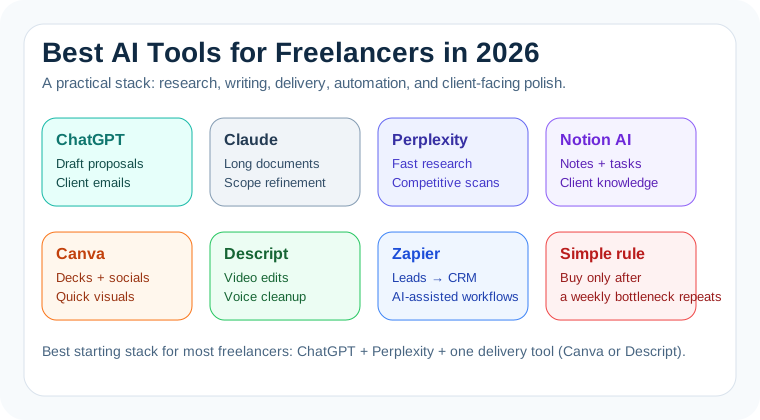
The best AI tools for freelancers at a glance
If you only want the short version:
- Best all-purpose assistant: ChatGPT
- Best for long documents and nuanced edits: Claude
- Best for fast research and source checking: Perplexity
- Best project hub with built-in AI: Notion AI
- Best for video, podcast, and client deliverables: Descript
- Best for automating repetitive admin: Zapier
- Best for visual polish on a deadline: Canva
1. ChatGPT: still the default for most freelancers
For most solo service businesses, ChatGPT is still the best place to start. OpenAI positions the paid tiers around projects, tasks, custom GPTs, deeper research, stronger reasoning, and larger file workflows. That maps well to freelance reality: proposals, call summaries, client emails, content drafts, revisions, and deliverable cleanup all live in one place.
Where it works best:
- Turning rough notes into clean proposals or scopes
- Drafting outreach and follow-up emails without sounding stiff
- Summarizing client briefs and uploaded files
- Rewriting copy for different tones, audiences, or offers
If your day already runs through writing, analysis, and uploaded files, ChatGPT is usually the highest-ROI first subscription. It is also why we keep recommending it in practical workflow pieces like how to use ChatGPT to save 2 hours per day and our ChatGPT email prompts guide.
2. Claude for better thinking and cleaner client work
Claude is the one to reach for when the task is not just writing fast, but thinking clearly. It stays especially useful for long briefs, transcripts, research packs, policy documents, and sensitive client-facing edits where tone matters.
Freelancers doing strategy, UX, research, consulting, editing, or high-trust writing work tend to like Claude for the same reason it does well in our ChatGPT vs Claude comparison: it usually feels less templated and better at nuance.
Use Claude when you need to:
- Refine messy thinking into a coherent recommendation
- Review long PDFs, discovery notes, or workshop transcripts
- Get stronger first-pass edits on positioning or narrative work
- Pressure-test a proposal before sending it to a client
3. Perplexity for research that does not eat your afternoon
Freelancers lose a lot of time to lightweight research: checking a client's market, pulling competitor pricing, finding recent examples, or verifying whether a claim is still true. Perplexity is strong exactly there because it behaves more like an AI search engine than a blank chat box.
That makes it a practical companion to ChatGPT rather than a replacement. Use Perplexity to gather current, source-linked information fast, then move that material into your workflow. That is the same division of labor we outlined in Perplexity vs ChatGPT for research.
- Best fit: market scans, competitor checks, tool research, source validation
- Less ideal: long-form drafting or sustained project management
4. Notion AI for project memory and client context
Freelancers do not just need output. They need a system. Notion's current AI pitch leans into built-in workspace help, connected search, meeting notes, research mode, and custom agents for recurring work. For solo operators, the bigger advantage is simpler: your notes, tasks, docs, and AI actions live together.
That matters once you have more than three active clients. Instead of asking an AI to remember project context from scratch every time, you can keep briefs, next steps, meeting notes, and deliverables in one workspace and use AI on top of that structure.
Notion AI is especially good for:
- Turning call notes into action items
- Building reusable project templates
- Keeping client knowledge in one searchable place
- Drafting updates, checklists, and SOPs from existing docs
5. Descript for freelancers who deliver audio or video
If part of your service involves podcasts, short-form clips, webinars, interviews, training videos, or async client updates, Descript is still one of the most practical tools in the category. Its pricing page is very direct about the value: text-based editing, AI cleanup, filler-word removal, voice tools, and increasingly capable generation features.
The real reason freelancers buy it is not novelty. It is speed. You can cut edits, clean audio, produce clips, and ship something client-safe without a full traditional editing stack.
Best for:
- Creators and consultants shipping client videos fast
- Podcast editors who want text-based trimming
- Agencies or freelancers repurposing one recording into multiple assets
6. Zapier when repeat admin is starting to hurt
Zapier is not the first AI tool most freelancers should buy. It is the tool you buy once the same admin work keeps showing up every week. Its current pricing and product messaging make that pretty clear: forms, tables, workflows, AI fields, and app integrations are all being pushed as one automation platform.
If leads come in through forms, calls create follow-up tasks, invoices need status changes, or CRM rows need cleanup, Zapier can stop you from doing boring but necessary glue work manually.
Typical freelancer use cases:
- New inquiry form → CRM row → follow-up draft → task creation
- Meeting booked → project template created → Slack/email notification sent
- Form responses cleaned up or categorized with AI before review
Do not start here unless the bottleneck is real. But once it is real, Zapier is often more valuable than yet another chatbot subscription.
7. Canva for fast, client-safe visuals
Freelancers regularly need decent-looking visuals with almost no warning: proposal decks, thumbnails, social graphics, lead magnets, workshop slides, or polished handoff docs. Canva remains the easiest way to do that quickly, and its AI-assisted features make that easier rather than dramatically different.
Canva is rarely the deepest tool on the list. It is one of the most useful because it helps you look finished. That matters when clients judge you by polish, not by how clever your workflow is.
What most freelancers should actually pay for first
If you are a writer, marketer, strategist, consultant, VA, or operator, the simplest good stack is:
- ChatGPT for daily execution
- Perplexity for current research
- Notion AI only if your project sprawl is getting messy
If you are more creator-heavy, swap Notion AI for Descript or Canva depending on whether your bottleneck is video/audio or design polish.
That matters because freelancers often overbuy tools too early. The right question is not “What is the smartest AI tool?” It is “Which bottleneck keeps showing up every week?” Buy for that.
Our verdict
The best AI tools for freelancers in 2026 are not the flashiest ones. They are the tools that make client work smoother, faster, and more professional without forcing you into a giant software stack.
If you want the short recommendation:
- Start with ChatGPT if you need one general-purpose assistant.
- Add Perplexity if research or source checking is costing you time.
- Add Claude if your work is document-heavy or nuance-heavy.
- Add Notion AI, Descript, Zapier, or Canva only when a specific workflow demands it.
That is the stack most freelancers actually need: one core assistant, one research layer, and one specialty tool tied to the kind of client work you get paid for.