Best AI tools for teachers is now a real buying search because teachers are under pressure from both sides at once: they need to plan faster, differentiate more, communicate more clearly, and still make classroom work feel human. The useful tools are not the ones promising to replace teaching. They are the ones that help with the ugly middle of the job: lesson prep, feedback, adapting materials, building activities, and giving students more support without creating more chaos for the teacher.
The freshness signal is strong in March 2026 because the market has clearly moved past generic chatbot hype. Brisk is now selling directly into teacher workflow inside Docs, Slides, Classroom, Canvas, and Microsoft 365, and says more than 2 million educators already use it. Curipod is pushing AI-powered, teacher-paced lessons with real-time feedback and says it is used by 12 million students. SchoolAI says it is used in over 1 million classrooms and has over 200,000 teacher-created Spaces. That is a sign of a category getting more specific and more classroom-shaped.
If you mostly want prompt ideas for one general assistant, start with our ChatGPT for teachers guide. If you are choosing tools for students as much as for teachers, read the best AI tools for students in 2026. But if your question is which AI tools actually help a teacher plan, differentiate, teach, and support students better, the stack below is the better place to start.
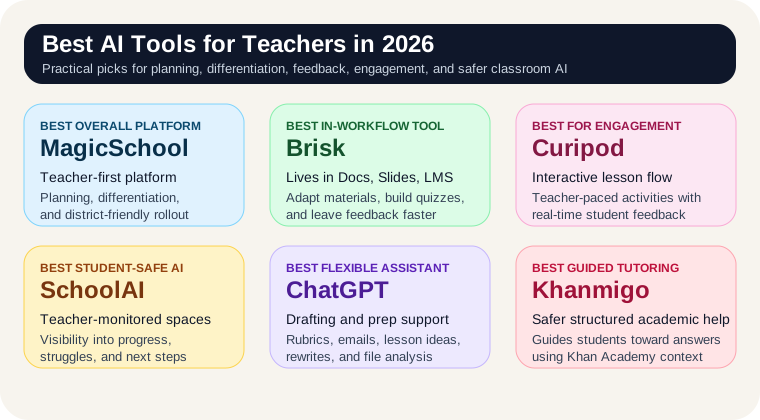
The best AI tools for teachers at a glance
- Best overall teacher-specific AI platform: MagicSchool
- Best for adapting materials and giving feedback inside your existing workflow: Brisk Teaching
- Best for interactive lessons and live classroom engagement: Curipod
- Best for student-safe AI activities with teacher visibility: SchoolAI
- Best flexible general assistant for prep, communication, and drafts: ChatGPT
- Best for guided tutoring tied to trusted academic content: Khanmigo
Why teachers are buying differently in 2026
Teachers are not buying AI because they want infinite worksheets. They are buying it because planning time is limited, differentiation is exhausting, and students still need more individualized support than one adult can deliver alone. The best AI tools for teachers in 2026 are the ones that reduce repetitive prep and give teachers better leverage without stripping away judgment.
The shift in this market is that teacher AI is getting less generic and more workflow-specific. One tool is strongest for adapting source material. Another is better for live lessons. Another works best when you want students using AI in a monitored environment instead of a free-form chat tab. That is a healthier market than the earlier phase where everything was just "use a chatbot better."
1. MagicSchool: best overall teacher-specific AI platform
MagicSchool earns the top spot because it is one of the clearest teacher-first products in the category. Its current positioning is explicitly about safe, district-aligned AI for schools that supports educators, sparks creativity, and improves student learning outcomes. That matters because many teachers do not just want a clever assistant. They want something that feels built for school reality rather than retrofitted from a general consumer tool.
MagicSchool makes the most sense when the goal is one practical platform for lesson planning, differentiation, classroom materials, and educator workflows without needing to stitch together six separate tools. It is especially attractive for school-wide or district-wide adoption because the product story is already framed around school alignment and safety rather than individual power-user hacks.
- Best fit: teacher teams, school adoption, lesson planning, differentiated materials, broad day-to-day educator support
- Weak spot: less embedded in your browser workflow than Brisk, so it may feel slower if your real pain is adapting materials in the middle of existing tabs
2. Brisk Teaching: best for working inside the tools you already use
Brisk Teaching is one of the strongest picks on the list because it is aimed directly at where teacher friction actually shows up: in the browser, inside documents, on curriculum pages, and while trying to give feedback at scale. Brisk says it works in Google Docs, Slides, Classroom, Canvas, and Microsoft 365, which gives it a cleaner workflow argument than tools that require you to copy everything into a separate app first.
The teacher value is obvious. Brisk can adapt curriculum, generate questions and presentations from articles or videos, create quizzes and rubrics, and help you leave more specific feedback without waiting until essay number 87 to burn out. If you already know what you want to teach and the bottleneck is turning materials into something your actual class can use, Brisk is one of the best fits in the market.
- Best fit: curriculum adaptation, faster feedback, generating slide decks and quizzes, working directly in Google and Microsoft school workflows
- Weak spot: less compelling if you want one broader teacher platform or a tightly monitored student-facing AI environment
3. Curipod: best for live lessons and student engagement
Curipod belongs here because it is solving a different problem than planning tools. Its current pitch is teacher-paced lessons powered by AI, built around interactive activities and real-time AI feedback. That makes it especially useful when your issue is not creating the lesson plan but getting students to actually engage with it.
Curipod looks strongest for classrooms where participation, writing, discussion, and on-the-spot feedback matter more than static worksheet generation. If you teach in a way that benefits from live checks for understanding, collaborative activity, or fast interactive slides, this is one of the more clearly differentiated tools in the category. It is also one of the easiest ways to turn "AI for teachers" into something students actually feel in class.
- Best fit: interactive lessons, student participation, writing practice, bell-ringers, discussion prompts, fast classroom-ready decks
- Weak spot: not the best core tool if your biggest pain is admin drafting, parent communication, or adapting source documents at scale
4. SchoolAI: best for student-safe AI and teacher monitoring
SchoolAI is one of the more interesting products on this list because it leans hard into the student-side trust problem. Its teacher page emphasizes teacher-monitored student use, real-time progress visibility, over 60 languages, and interactive Spaces that can be created or reused from a large shared library. That is meaningfully different from simply giving students access to a general chatbot and hoping for the best.
If your school or classroom wants AI to support actual student work while still letting teachers see where learners are struggling, SchoolAI is a strong candidate. It makes more sense than a generic assistant when the real question is, "How do I let students use AI without losing visibility, guardrails, or classroom control?"
- Best fit: monitored student AI use, intervention visibility, multilingual classrooms, personalized activities, teacher-managed classroom AI
- Weak spot: more of a classroom platform than a pure personal prep assistant for teachers working alone
5. ChatGPT: best flexible assistant for prep and communication
ChatGPT is still one of the best AI tools for teachers because it is useful across a weirdly broad set of tasks: lesson-plan scaffolds, rubric drafts, parent emails, quiz ideas, reading-level rewrites, discussion prompts, newsletter copy, and summaries of uploaded curriculum docs. OpenAI is now framing ChatGPT around professional work with web search, file analysis, canvas-based editing, image support, and agent-style task execution. For teachers, that means it continues to be the most flexible general assistant on the list.
The tradeoff is that ChatGPT is not teacher-shaped by default. It does not know your district policies, your LMS, your classroom culture, or your student privacy rules unless you create a process around it. That is why it works best as a versatile drafting and thinking partner rather than the center of classroom AI. If you are still choosing a general assistant layer, compare ChatGPT vs Claude before you commit.
- Best fit: lesson drafts, parent communication, rubrics, worksheet ideas, reading-level rewrites, fast brainstorming, general prep support
- Weak spot: weaker on built-in school workflow, student monitoring, and education-specific guardrails than the teacher-native tools above
6. Khanmigo: best for guided tutoring and Khan Academy-aligned support
Khanmigo is worth including because it addresses a core problem differently from most tools here. Khan Academy positions it as an AI-powered teaching assistant and tutor designed around safety and learning, with the explicit point that it guides learners toward answers instead of just handing them over. It is also tied to Khan Academy's content library, which gives it a stronger curriculum anchor than a pure general-purpose assistant.
Khanmigo makes the most sense when you want guided student support, tutoring-style practice, or a safer on-ramp for AI in academic work. It is less flexible than ChatGPT and less teacher-operational than Brisk or MagicSchool, but it is a credible option when the real goal is structured learning support instead of pure teacher productivity.
- Best fit: guided tutoring, structured academic help, Khan Academy-heavy classrooms, safer student support use cases
- Weak spot: less flexible for broad teacher workflow tasks, and its access model is narrower than the more open tools on this list
What most teachers should buy first
Most teachers should not buy based on the loudest AI demo. They should buy for the slowest recurring part of the job.
- Start with MagicSchool if you want the clearest teacher-specific all-around platform
- Start with Brisk if the pain is adapting materials, creating assessments, and giving feedback inside your existing workflow
- Start with Curipod if student engagement and live lesson flow are the real bottlenecks
- Start with SchoolAI if you want students using AI in a safer, monitored classroom structure
- Start with ChatGPT if you mainly need a flexible assistant for prep, drafting, and communication at the lowest friction
- Start with Khanmigo if guided tutoring and structured student support matter more than teacher workflow automation
This is the same rule we use in other practical roundups: buy for the bottleneck, not the category label. If classroom decks and visual materials are still eating your time, also read our guide to the best AI presentation tools.
What not to do
- Do not paste sensitive student information, IEP details, or private assessment data into consumer AI tools casually.
- Do not let AI-generated feedback or grades go out to students without teacher review.
- Do not buy a student-facing AI tool before deciding how visibility, safety, and approval will work in your classroom or school.
- Do not add three overlapping AI tools when one good workflow fit would solve the problem.
- Do not confuse faster prep with better teaching. AI should remove friction, not replace judgment.
If the trust question still feels unresolved, our ChatGPT safety guide is still a useful companion read before rollout.
Our verdict
The best AI tools for teachers in 2026 are the ones that buy back time without making the classroom less trustworthy. MagicSchool is the best overall teacher-specific platform on this list. Brisk Teaching is the best fit for adapting curriculum and giving feedback inside the tools teachers already use. Curipod is one of the strongest choices for interactive lessons. SchoolAI is a smart pick for monitored student AI. ChatGPT remains the most flexible general assistant. Khanmigo is the strongest guided tutoring option tied to trusted learning content.
If you only remember one thing, make it this: teacher AI is worth paying for when it removes repetitive prep and gives students better support without weakening trust. If it only creates more content for you to sort through, it is adding noise, not leverage.