The best AI video generators in 2026 are not all trying to solve the same problem. Some create net-new cinematic clips from prompts. Some turn a script into an avatar-led explainer. Some help you turn existing footage into something publishable without losing a weekend to editing. If you buy the flashiest demo instead of the tool that matches your workflow, you end up paying for pixels you never actually ship.
That matters more now because the category moved again. Runway kept pushing higher-end controllable generation with Gen-4.5, Synthesia leaned harder into interactive business video through Synthesia 3.0, HeyGen kept improving avatar and localization workflows, Adobe shipped fresh Firefly video/editor updates in March 2026, and Descript kept collapsing editing drudgery into text-first AI actions. The real buyer question is no longer can AI make video? It is which AI video tool removes the right bottleneck for me?
If your workflow is broader than video, start with our AI tools for content creators and AI tools for marketers guides. If your bottleneck starts earlier at scripting, hooks, and messaging, our AI writing tools comparison is also worth reading before you pay for another video subscription.
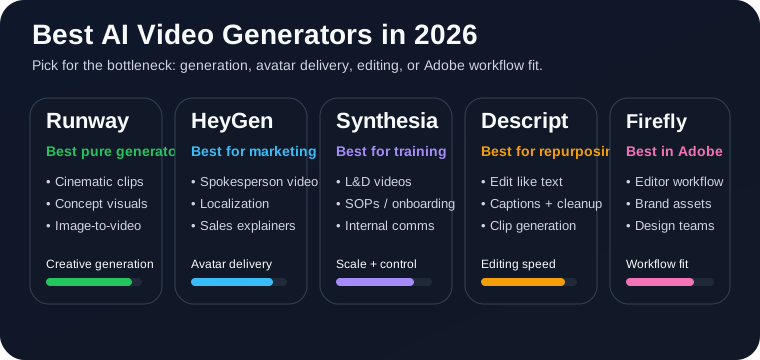
Quick answer: which AI video generator should you use?
- Use Runway if you want the strongest pure AI video generation tool for cinematic clips, concept visuals, and visual experiments.
- Use HeyGen if you want polished spokesperson videos, fast localization, and marketing-ready outputs without a real camera setup.
- Use Synthesia if your work is training, internal comms, enablement, or structured business video at scale.
- Use Descript if you already have footage and want the fastest path from raw recording to a cleaned-up, repurposed publishable video.
- Use Adobe Firefly if you already live in Adobe and want AI video generation inside a broader design/editing workflow.
If you specifically mean text-to-video generation, Runway is the best pure AI video generator in 2026. If you mean what actually helps a business make useful videos faster, HeyGen and Synthesia are often the smarter buy because they solve a narrower problem more repeatably.
1. Runway: best pure AI video generator for cinematic clips and visual concepts
Runway is still the easiest recommendation when someone says, “I want AI to actually generate footage.” Its recent Gen-4.5 push is not just about prettier demos. The practical win is better consistency, stronger prompt adherence, and more believable motion than the category average. If you need concept shots, stylized inserts, mood pieces, or fast B-roll that did not exist before, Runway is the tool here most likely to feel like a real generator instead of a talking-head template system.
That also makes it one of the most useful AI video tools for people already doing design and creator work. If your work overlaps with visual ideation, brand storytelling, or experimental content, this pairs naturally with our AI tools for designers coverage.
- Best fit: creators, agencies, marketers, and product teams that need net-new visual footage fast
- Weak spot: not the best default when your output is mostly training videos, localized explainers, or screen-recording cleanup
- Buy it if: your bottleneck is generating scenes, B-roll, or visual concepts that would otherwise require a shoot or stock hunt
2. HeyGen: best for spokesperson videos, sales videos, and localization
HeyGen is one of the clearest examples of why “best AI video generator” is now a misleading phrase. For a lot of businesses, they do not need cinematic generative footage. They need a polished person on screen saying the right thing, in the right language, with decent pacing, without booking talent or rebuilding the whole thing every time the script changes.
That is where HeyGen is strong. The product has kept leaning into avatar quality, translation, lip-synced localization, and marketing-friendly workflows. If your KPI is getting product explainers, onboarding intros, outbound sales videos, or localized social clips out the door quickly, HeyGen often feels more useful than a pure text-to-video tool.
- Best fit: multilingual marketing, sales enablement, onboarding, product intros, and spokesperson-style videos
- Weak spot: less compelling if you want original cinematic footage or heavier editing control
- Buy it if: your team keeps saying “we should make more video” but the real blocker is speed, camera comfort, and localization effort
3. Synthesia: best for training, internal communication, and structured business video
Synthesia remains one of the strongest business-video buys because it stays focused on a real operational use case: repeatable, controlled, presenter-led videos for work. Its 3.0 direction makes that even clearer. The product is moving toward more interactive video experiences, stronger business-context handling, and better enterprise-friendly reuse instead of trying to win the internet with surreal demo clips.
If you run learning and development, customer education, HR enablement, SOP training, or internal updates, this matters more than raw generative wow-factor. Synthesia is not the most exciting tool on this page, but it is one of the easiest to justify when you need a lot of clear, consistent business video.
- Best fit: L&D, operations, customer education, internal comms, and repeatable training content
- Weak spot: output can feel more corporate and structured than creative if your goal is brand storytelling or cinematic visuals
- Buy it if: you need a scalable internal video workflow more than a creative toy
4. Descript: best for editing and repurposing existing footage with AI
Descript belongs in this guide because a huge percentage of “AI video” work is not generation from scratch. It is fixing audio, cutting filler, turning webinars into clips, creating captions, cleaning up talking-head footage, swapping in B-roll, or getting a rough draft edited before someone touches a real timeline. Descript still does that better than most tools because it treats editing like document work instead of timeline punishment.
Its homepage pitch is still basically correct: edit video as easily as typing, then let the AI remove busywork. Studio Sound, filler-word removal, Eye Contact, transcription, captions, quick design, and AI-assisted clip generation all stack into one practical outcome: less editing friction. For a lot of teams, that matters more than generating a brand-new fantasy scene from text.
- Best fit: podcasts, webinars, interviews, talking-head videos, async updates, and fast social repurposing
- Weak spot: not the best standalone buy if what you really want is high-end generative footage from prompts
- Buy it if: you already have recordings and the painful part is turning them into something good enough to publish
5. Adobe Firefly: best if your creative workflow already lives inside Adobe
Adobe Firefly is getting harder to ignore because the company is no longer treating video generation as a side experiment. The March 2026 Firefly updates pushed video editor capabilities further, including smoother scene transitions, more direct video generation inside the editor, transparent-background video generation, and stronger controls around how clips are generated and sequenced.
The main reason to buy Firefly is not that it beats every specialist tool head-to-head. It is that it fits the wider Adobe stack. If your team already works in Adobe for design, motion, brand assets, and revisions, Firefly can reduce handoffs instead of adding another isolated AI subscription. It is especially relevant if your video work sits next to presentation, design, and brand-system work rather than creator-style experimentation. Our AI presentation tools guide is a useful companion read if that sounds like your workflow.
- Best fit: Adobe-heavy creative teams, agencies, designers, and brand workflows
- Weak spot: less attractive as a universal standalone choice if you are not already in Adobe's ecosystem
- Buy it if: your goal is tighter workflow integration, not just another AI toy tab
What about Sora and Veo-style models?
They matter. They are also not my top practical buyer picks right now.
The problem is not output quality alone. The problem is repeatable workflow. A lot of buyers do not need the most impressive demo clip. They need a reliable way to make marketing videos, training videos, explainers, or repurposed content on a deadline. That is why this list leans toward tools you can actually operationalize rather than only the models that dominate conversation.
If access, pricing, workflow integration, and consistency stabilize further, that answer can change. Right now, I would still rather buy a tool that helps me ship every week than a model that occasionally produces a jaw-dropping clip.
Final verdict
Runway is the best AI video generator in 2026 if you want genuine text-to-video and image-to-video generation. It is the strongest pure pick for new footage, concept visuals, and creative experimentation.
HeyGen is the best practical business-video pick if your work is outward-facing explainers, spokesperson videos, and localization. Synthesia is the smarter choice when the job is training, internal enablement, and repeatable structured video. Descript is the fastest buy for teams drowning in raw recordings. Adobe Firefly makes the most sense when AI video is just one part of a bigger Adobe-driven creative workflow.
The mistake most buyers make is treating this like one category. It is not. Decide whether you need generation, avatar delivery, localization, editing speed, or workflow fit. Then buy for that bottleneck.