Copilot vs ChatGPT for work is not really a model-vs-model argument anymore. It is a workflow argument. Both tools can draft emails, summarize files, brainstorm ideas, and answer questions. What matters is whether you want AI living inside Microsoft 365 or whether you want the more flexible all-purpose assistant.
That distinction gets expensive fast. If your day happens in Word, Excel, Teams, Outlook, and SharePoint, Microsoft 365 Copilot has a native advantage that ChatGPT cannot fully fake. If your work is more mixed — web research, writing, file analysis, brainstorming, and multi-step projects across lots of tools — ChatGPT is usually the stronger daily default.
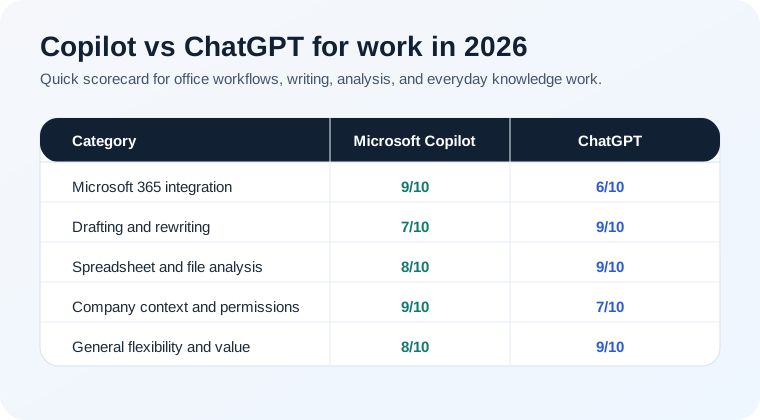
The short version: Copilot is better for Microsoft-first organizations. ChatGPT is better for most individual knowledge workers who want range, polish, and stronger general-purpose output.
Where Copilot has the clear work advantage
Microsoft's pitch is straightforward and, for many teams, genuinely compelling: Copilot works inside the software people are already paid to use. Microsoft's product pages lean hard on chat across work content, AI search, notebook-style project context, and agents that can operate with your organization's files, meetings, chats, and permissions.
That matters because switching tools is a tax. Copilot reduces that tax when your workflow is already inside Microsoft 365:
- Outlook: drafting replies and summarizing long email threads is a natural fit.
- Word and PowerPoint: turning rough ideas into first drafts or slides is easier when the assistant is already in the document.
- Teams meetings: Copilot can use meeting context, chat history, and files tied to the project.
- Enterprise search: Microsoft's current messaging around Work IQ is basically "search your work, not just the web." For companies deep in Microsoft, that is real value.
If you are comparing tools for an organization rather than a solo user, this is the strongest reason to prefer Copilot. It can inherit Microsoft permissions and organizational context in a way that feels more native than bolting an external assistant onto office work.
Where ChatGPT is better for most people
ChatGPT still feels like the better general work assistant. OpenAI's overview and pricing pages emphasize exactly why: strong writing help, web search, file analysis, image understanding, projects, tasks, custom GPTs, deep research, and agent-style web actions in one place.
That broader toolkit shows up in real work quickly:
- Writing and rewriting: ChatGPT usually gives cleaner first drafts and better tone control, especially when the ask is messy.
- Thinking through problems: it tends to stay more coherent when work becomes multi-step or ambiguous.
- File work: dropping in a spreadsheet, notes, a PDF, or a CSV and asking for analysis is one of its best everyday use cases.
- Custom workflows: if you later want repeatable internal helpers, custom GPTs are still an easier entry point than most office-suite automation.
This is also why ChatGPT keeps showing up as the safer broad recommendation across our comparison cluster, including the more general ChatGPT vs Claude comparison and the consumer-leaning Gemini vs ChatGPT for daily use guide.
Copilot vs ChatGPT for specific work tasks
1. Email and internal communication
Slight edge to Copilot if your team lives in Outlook and Teams. The main reason is context: email threads, meeting history, and attached files already live there. For pure drafting quality, though, ChatGPT still often writes the better first pass. If this is your main pain point, our ChatGPT email prompts guide is still one of the most practical starting points.
2. Word docs, reports, and slide decks
Edge to Copilot inside Microsoft 365, especially for users who want help without leaving the app. Edge to ChatGPT if the job is more exploratory and you need brainstorming, restructuring, or heavier rewriting before anything goes into the final document.
3. Spreadsheet and file analysis
Slight edge to ChatGPT. It is usually easier to throw a file into ChatGPT and ask weird, practical questions. Copilot can be excellent when the data is already in Excel and the user just wants help staying inside that environment. But for flexible analysis, ChatGPT still feels stronger. That is the same reason we recommend it for tactical workflows like using ChatGPT for Excel formulas.
4. Company knowledge and internal search
Clear edge to Copilot in Microsoft-native companies. Microsoft's enterprise pitch around permissions, governed access, and work data is exactly what this use case needs. If your files, chats, and docs all live in Microsoft, Copilot is playing on home turf.
5. Mixed-tool knowledge work
Clear edge to ChatGPT. If your work crosses web apps, docs, uploads, brainstorming, web research, and ad hoc tasks, ChatGPT is more adaptable and less tied to one vendor stack.
Pricing and value: what you're actually paying for
Price comparisons get sloppy fast because these tools are sold in different ways.
ChatGPT sells range. Even the pricing page frames the paid plans around broader capability: more messages, stronger models, expanded uploads, agent mode, projects, tasks, custom GPTs, and deeper memory. If you are an individual paying out of pocket, that package is easy to understand.
Copilot sells integration. Microsoft's consumer pages position Copilot as free to start, then push the bigger value proposition through Microsoft 365 plans and premium AI features. For many businesses, the price only makes sense if employees will actually use Copilot inside Word, Excel, Outlook, Teams, and company search every day.
So the better value depends on the buyer:
- Solo professional or freelancer: ChatGPT is usually the better spend.
- Company already standardized on Microsoft 365: Copilot has a stronger ROI story.
- Team with messy mixed-tool workflows: ChatGPT often delivers faster because it is less dependent on stack alignment.
If you are still deciding whether paying for ChatGPT is worth it at all, read ChatGPT Plus vs Free before you commit.
The biggest difference is control vs flexibility
Copilot is strongest when the organization wants AI inside managed software, with governed access to work content and as little workflow disruption as possible.
ChatGPT is strongest when the user wants a high-ceiling assistant that can handle a wider variety of tasks, file types, and ways of working.
That is why these tools can both be "best" depending on context. One is not replacing the other everywhere. They are optimizing for different environments.
Our verdict
If you work at a company that runs on Microsoft 365 and actually wants AI embedded into Outlook, Teams, Word, Excel, and company search, Copilot is the better work tool. That is the whole point of the product, and in the right environment it is a meaningful advantage.
If you are choosing one AI assistant for broad office work, side projects, research, writing, file analysis, and everyday problem-solving, ChatGPT is still the better recommendation for most people. It is more flexible, usually writes better, and handles weird real-world tasks with less friction.
Simple recommendation:
- Choose Copilot if your work is deeply tied to Microsoft 365 and company knowledge.
- Choose ChatGPT if you want the best all-purpose work assistant.
- Use both if your employer gives you Copilot but you personally rely on ChatGPT for writing, analysis, and planning.
That third option is extremely common for a reason. Copilot owns the Microsoft lane. ChatGPT still owns the broader assistant lane.